PCB 보드 한글을 영문으로 옮김
| GPIO 라이브러리 - WiringPi - Pigpio - Gpiozero - Rpi.GPIO |
GPIO 라이브러리 - WiringPi - Pigpio - Gpiozero - Rpi.GPIO |
| 웹서버 DB 설치 순서 1 Apache 2 MySQL 3 PHP 4 phpMyAdmin |
Web server, DB installation order 1 Apache 2 MySQL 3 PHP 4 phpMyAdmin |
| CLI 기본 명령 sudo apt-get update: 패키지 목록 업데이트 sudo apt-get upgrade: 프로그램 업데이트 sudo 명령어: Super User cat /proc/version: OS버전 확인하기 cat /proc/cpuinfo: CPU버전 확인하기 df -a 혹은 df -h: SD 카드 용량 확인 startx: Linux GUI 실행 sudo raspi-config: 시스템 설정 ifconfig: 인터넷 설정 정보 |
CLI Basic Commands sudo apt-get update: Update package list sudo apt-get upgrade: Update program sudo Command: Super User cat /proc/version: Check OS version cat /proc/cpuinfo: Check CPU version df -a or df -h: Check SD card capacity startx: Run Linux GUI sudo raspi-config: System configuration ifconfig: Internet configuration information |
| 카메라 2대 출력 모듈 확인 libcamera-hello --list-cameras 영상 출력 libcamera-hello --camera 0 -t 0 libcamera-hello --camera 1 -t 0 |
Output 2 cameras Check modules libcamera-hello --list-cameras Output video libcamera-hello --camera 0 -t 0 libcamera-hello --camera 1 -t 0 |
| IO Board 구조 커넥터 번호가 GPIO 번호 G: GND, 33: 3.3V UART: UART ADC0~ADC3: 아날로그 입력 I2C0~I2C3: I2C 인터페이스 J16, J26, j20: +5v 출력 j6, j13, j19: +12v 출력 |
IO Board Output Connector number is GPIO number G: GND, 33: 3.3V UART: UART ADC0~ADC3: Analog input I2C0~I2C3: I2C interface J16, J26, j20: +5v output j6, j13, j19: +12v output |
| 한글 폰트 설치 sudo apt-get install fonts-unfonts-core sudo apt-get install fonts-unfonts-extra sudo apt-get install ibus sudo apt-get install ibus-hangul |
|
| Linux 기본 명령어 date 년월일시 출력 pwd 현재 작업 위치출력 cd 폴더 폴더로 이동 cd .. 상위 폴더로 이동 cd 루트폴더로이동 ls, ls -l 파일 목록 mkdir 폴더 폴더를 생성 echo "hello">file.txt -- 파일생성 cp FN1 FN2 파일 복사 mv FN2 FN4 파일 변경 rm file5 파일삭제 rm 폴더 폴더 삭제 rm -r 파일 폴더 삭제 clear 화면 clear |
Linux basic commands date: Print year/month/day/time pwd: Print current working location cd folder name: Move to folder cd ..: Move to upper folder cd: Move to root folder ls, ls -l: List of files mkdir: Create folder folder echo "hello">file.txt: Create file cp File1 file2: Copy file mv File3 File4: Change file rm file5: Delete file rm folder: Delete folder rm -r: Delete file folder clear: Clear screen |
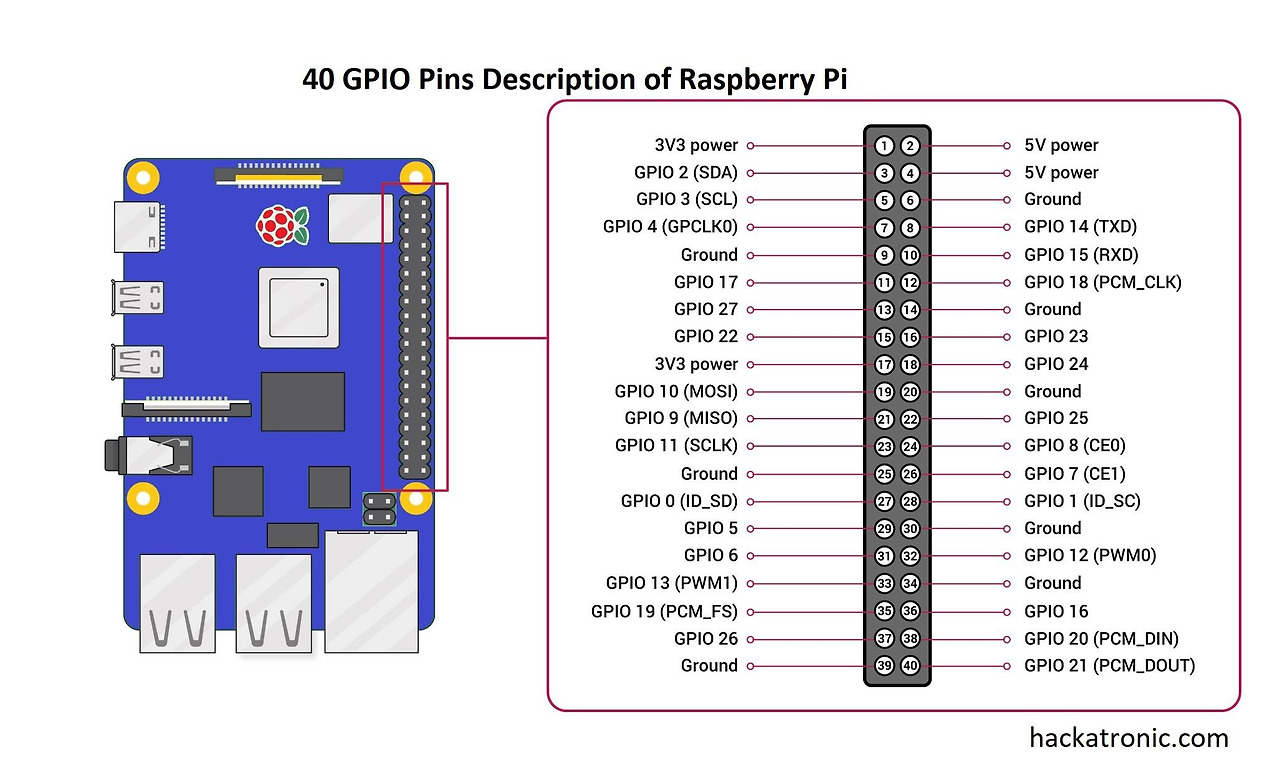
| 40P GPIO BCM wPi wPi BCM |
40P GPIO BCM wPi wPi BCM |
| 브래드 보드 구조 이미지 | 브래드 보드 구조 이미지 |
| 전자 부품 기호 이미지 | 전자 부품 기호 이미지 |
| 필수 프로그램 1. Putty 2. Win32 Disk Imager 3. SD Memory Card Formatter |
Essential Utility Programs 1. Putty 2. Win32 Disk Imager 3. SD Memory Card Formatter |
GPIO 라이브러리
- WiringPi
- Pigpio
- Gpiozero
- Rpi.GPIO
GPIO library
- WiringPi
- Pigpio
- Gpiozero
- Rpi.GPIO
웹서버 DB 설치 순서
1 Apache
2 MySQL
3 PHP
4 phpMyAdmin
Web server, DB installation order
1 Apache
2 MySQL
3 PHP
4 phpMyAdmin
CLI 기본 명령
sudo apt-get update: 패키지 목록 업데이트
sudo apt-get upgrade: 프로그램 업데이트
sudo 명령어: Super User
cat /proc/version: OS버전 확인하기
cat /proc/cpuinfo: CPU버전 확인하기
df -a 혹은 df -h: SD 카드 용량 확인
startx: Linux GUI 실행
sudo raspi-config: 시스템 설정
ifconfig: 인터넷 설정 정보
CLI Basic Commands
sudo apt-get update: Update package list
sudo apt-get upgrade: Update program
sudo Command: Super User
cat /proc/version: Check OS version
cat /proc/cpuinfo: Check CPU version
df -a or df -h: Check SD card capacity
startx: Run Linux GUI
sudo raspi-config: System configuration
ifconfig: Internet configuration information
카메라 2대 출력
모듈 확인
libcamera-hello --list-cameras
영상 출력
libcamera-hello --camera 0 -t 0
libcamera-hello --camera 1 -t 0
Output 2 cameras
Check modules
libcamera-hello --list-cameras
Output video
libcamera-hello --camera 0 -t 0
libcamera-hello --camera 1 -t 0
IO Board 구조
커넥터 번호가 GPIO 번호
G: GND, 33: 3.3V
UART: UART
ADC0~ADC3: 아날로그 입력
I2C0~I2C3: I2C 인터페이스
J16, J26, j20: +5v 출력
j6, j13, j19: +12v 출력
IO Board Output
Connector number is GPIO number
G: GND, 33: 3.3V
UART: UART
ADC0~ADC3: Analog input
I2C0~I2C3: I2C interface
J16, J26, j20: +5v output
j6, j13, j19: +12v output
한글 폰트 설치
sudo apt-get install fonts-unfonts-core
sudo apt-get install fonts-unfonts-extra
sudo apt-get install ibus
sudo apt-get install ibus-hangul
Linux 기본 명령어
date 년월일시 출력
pwd 현재 작업 위치출력
cd 폴더 폴더로 이동
cd .. 상위 폴더로 이동
cd 루트폴더로이동
ls, ls -l 파일 목록
mkdir 폴더 폴더를 생성
echo "hello">file.txt
-- 파일생성
cp FN1 FN2 파일 복사
mv FN2 FN4 파일 변경
rm file5 파일삭제
rm 폴더 폴더 삭제
rm -r 파일 폴더 삭제
clear 화면 clear
Linux basic commands
date: Print year/month/day/time
pwd: Print current working location
cd folder name: Move to folder
cd ..: Move to upper folder
cd: Move to root folder
ls, ls -l: List of files
mkdir: Create folder folder
echo "hello">file.txt: Create file
cp File1 file2: Copy file
mv File3 File4: Change file
rm file5: Delete file
rm folder: Delete folder
rm -r: Delete file folder
clear: Clear screen
40P GPIO
BCM wPi wPi BCM
필수 프로그램
1. Putty
2. Win32 Disk Imager
3. SD Memory Card Formatter
Essential Utility Programs
1. Putty
2. Win32 Disk Imager
3. SD Memory Card Formatter
'라즈베리파이 5' 카테고리의 다른 글
| 튜토리얼이 포함된 최고의 라즈베리 파이 프로젝트 (1) | 2025.02.04 |
|---|---|
| Raspberry Pi에서 Arduino 프로그래밍 (0) | 2025.01.29 |
| 라즈베리 파이 5 마이크로 HDMI-HDMI 다기능 어댑터 (0) | 2025.01.17 |
| OpenWrt 프로젝트는 임베디드 디바이스를 대상으로 하는 Linux 운영 체제 (0) | 2025.01.12 |
| 라즈베리 파이 5 PCIe to M.2 Hat (0) | 2025.01.02 |
| 라즈베리 파이 5 AI 키트, Hailo AI 가속 모듈 (0) | 2024.12.31 |
| YOLOv8-Object-Detection-with-DeepSORT-Tracking (1) | 2024.12.20 |
| Raspberry Pi 500 features (3) | 2024.12.16 |
취업, 창업의 막막함, 외주 관리, 제품 부재!
당신의 고민은 무엇입니까? 현실과 동떨어진 교육, 실패만 반복하는 외주 계약,
아이디어는 있지만 구현할 기술이 없는 막막함.
우리는 알고 있습니다. 문제의 원인은 '명확한 학습, 실전 경험과 신뢰할 수 있는 기술력의 부재'에서 시작됩니다.
이제 고민을 멈추고, 캐어랩을 만나세요!
코딩(펌웨어), 전자부품과 디지털 회로설계, PCB 설계 제작, 고객(시장/수출) 발굴과 마케팅 전략으로 당신을 지원합니다.
제품 설계의 고수는 성공이 만든 게 아니라 실패가 만듭니다. 아이디어를 양산 가능한 제품으로!
귀사의 제품을 만드세요. 교육과 개발 실적으로 신뢰할 수 있는 파트너를 확보하세요.
캐어랩


