Specifications
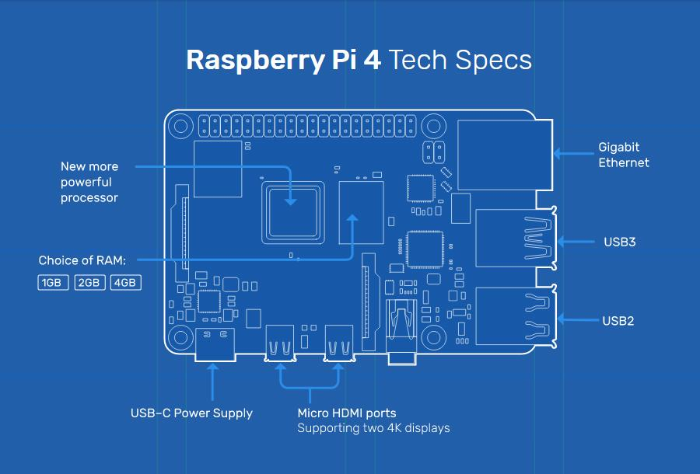
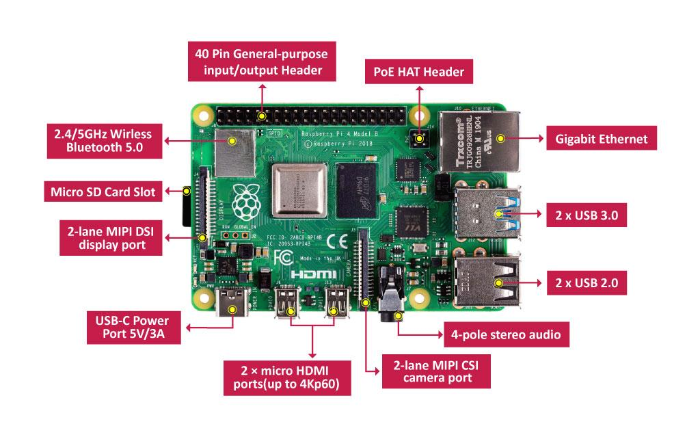
- Broadcom BCM2711, Quad core Cortex-A72 (ARM v8) 64-bit SoC @ 1.5GHz
- 1GB, 2GB or 4GB LPDDR4-3200 SDRAM (depending on model)
- 2.4 GHz and 5.0 GHz IEEE 802.11ac wireless, Bluetooth 5.0, BLE
- Gigabit Ethernet
- 2 USB 3.0 ports; 2 USB 2.0 ports.
- Raspberry Pi standard 40 pin GPIO header (fully backwards compatible with previous boards)
- 2 × micro-HDMI ports (up to 4kp60 supported)
- 2-lane MIPI DSI display port
- 2-lane MIPI CSI camera port
- 4-pole stereo audio and composite video port
- H.265 (4kp60 decode), H264 (1080p60 decode, 1080p30 encode)
- OpenGL ES 3.0 graphics
- Micro-SD card slot for loading operating system and data storage
- 5V DC via USB-C connector (minimum 3A*)
- 5V DC via GPIO header (minimum 3A*)
- Power over Ethernet (PoE) enabled (requires separate PoE HAT)
- Operating temperature: 0 – 50 degrees C ambient
* A good quality 2.5A power supply can be used if downstream USB peripherals consume less than 500mA in total.
Documents
- Raspberry Pi 4 Model B product brief
- Raspberry Pi 4 Model B schematic diagrams
- Raspberry Pi 4 Model B mechanical drawing
- Documentation including hardware and configuration
Software & OS
Beginners should start with the NOOBS (New Out Of Box Software) operating system installation manager, which gives the user a choice of operating system from the standard distributions.
SD cards with NOOBS pre-installed should be available from any of our global distributors and resellers. Alternatively, you can download NOOBS.
Raspbian is the recommended operating system for normal use on a Raspberry Pi.
Find help with installing Raspbian on your Pi in our online Getting started guide.
You can browse basic examples to help you get started with some of the software available in Raspbian, find more detail about the Raspbian operating system, or read information on fundamental Linux usage and commands for navigating the Raspberry Pi and managing its file system and users.
Obsolescence Statement
Raspberry Pi 4 Model B will remain in production until at least January, 2026
참고 사이트: RaspberryPi 4 Model B Speification
사는 곳: Newark
'개발자 > 라즈베리파이4' 카테고리의 다른 글
| 라즈베리파이 i2c 사용하기 ssd1306 OLED와 함께 (0) | 2020.11.18 |
|---|---|
| RaspberryPi 온도 습도 센서 DHT11 python 코드 (0) | 2020.11.06 |
| RaspberryPi AM2301 온도 습도 센서 python 코드 using the DHT22 (4) | 2020.11.06 |
| Raspberry Pi로 Ubidots에 데이터 보내고 받기 2 (0) | 2020.11.04 |
| 라즈베리파이4 기반 AI IoT 가이드 7강 Maria DB 기본 (0) | 2020.07.31 |
| 라즈베리파이4 기반 AI IoT 가이드 1강 시작하기 (0) | 2020.07.30 |
| 라즈베리파이란? -라즈베리파이4 시작하기 (0) | 2020.07.07 |
| 라즈베리파이 4 Model B 출시, 더 많은 사용자와 강력한 Desk Top (0) | 2019.06.24 |
취업, 창업의 막막함, 외주 관리, 제품 부재!
당신의 고민은 무엇입니까? 현실과 동떨어진 교육, 실패만 반복하는 외주 계약,
아이디어는 있지만 구현할 기술이 없는 막막함.
우리는 알고 있습니다. 문제의 원인은 '명확한 학습, 실전 경험과 신뢰할 수 있는 기술력의 부재'에서 시작됩니다.
이제 고민을 멈추고, 캐어랩을 만나세요!
코딩(펌웨어), 전자부품과 디지털 회로설계, PCB 설계 제작, 고객(시장/수출) 발굴과 마케팅 전략으로 당신을 지원합니다.
제품 설계의 고수는 성공이 만든 게 아니라 실패가 만듭니다. 아이디어를 양산 가능한 제품으로!
귀사의 제품을 만드세요. 교육과 개발 실적으로 신뢰할 수 있는 파트너를 확보하세요.
캐어랩


