OpenWeatherMap을 활용한 실시간 기상 정보 Display
본 포스팅의 원문은 Nano 33 IoT를 사용한 프로젝트 모음 사이트의 Online Weather Display Using OpenWeatherMap입니다. 간단한 부품으로 오픈 기상청에 연결해 날씨 데이터를 가져와 OLED에 디스플레이합니다. 번역하여 옮기느라 정확하지 못한 문장이 있을 수 있습니다.
필요한 부품을 아래에 나타냅니다.
 |
ElectroPeak 0.96" OLED 64x128 Display Module 1. 개 |
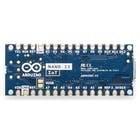 |
Arduino Nano 33 IoT 1개 |
이 프로젝트에서는 다른 작업과 함께 API 키를 설정하고 획득해야 하므로 비디오를 시청하여 모든 것이 어떻게 함께 진행되는지 이해하는 것이 좋습니다. 비디오는 또한 이해하기 쉽도록 스케치를 분해합니다. 비디오는 이 주제를 단계별로 다루지 만 날씨 정보에 액세스 하려면 OpenWeatherMap 웹 사이트에서 API 키를 얻어야 합니다. 완료되면 스케치를 다운로드하고 업데이트하고 도시 세부 정보를 업데이트하는 것을 잊지 마십시오.
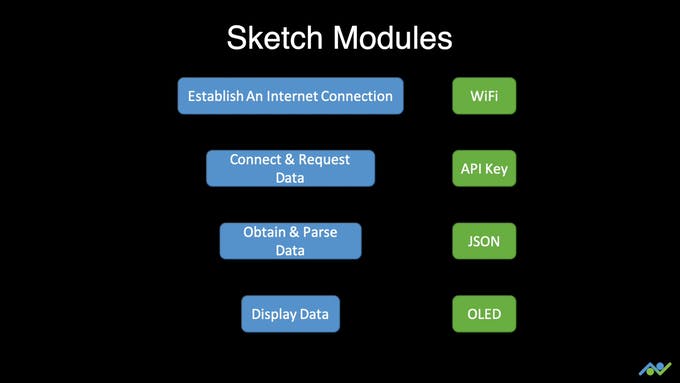
관련 링크를 참고하십시오.
Relevant Links:
- Service: https://openweathermap.org/
- ArduinoJSON Assistant: https://arduinojson.org/v6/assistant/
- URL: api.openweathermap.org/data/2.5/weather?q=Edinburgh, uk&units=metric&APPID=YOUR_API_KEY
아래 이미지는 OLED 연결도를 보여줍니다. Nano 33 IoT의 I2C 핀은 A4와 A5임을 잊지 마세요.

소스코드는 네트워크 정보를 기록한 arduino_secret.h와 diy-e4.ino로 구성됩니다. 깃허브 코드 페이지를 참고하십시오.
arduino_secret.h 에 사용중인 무선 네트워크 SSID와 패스워드를 " " 사에에 기록합니다.
#define SECRET_SSID "Network"
#define SECRET_PASS "Password"
아래의 소스코드가 동작파일로 diy-e4.ino입니다.
/********************************************************************************************************************
 *  This sketch obtains online weather information from the OpenWeatherMap service and displays it to an OLED module
 *  Written for the Arduino Nano 33 IoT Board and 0.96" I2C OLED Module
 *
 *  By Frenoy Osburn
 *  YouTube Video: https://youtu.be/-62JGZm2DrA
 *********************************************************************************************************************/

 /********************************************************************************************************************
 *  Useful Links:
 *  https://openweathermap.org/
 *  ArduinoJSON Assistant: https://arduinojson.org/v6/assistant/
 *  URL: api.openweathermap.org/data/2.5/weather?q=Edinburgh,uk&units=metric&APPID=YOUR_API_KEY
 *********************************************************************************************************************/

#include <SPI.h>
#include <WiFiNINA.h>
#include <stdio.h>
#include <ArduinoJson.h>
#include <U8g2lib.h>
#include "arduino_secrets.h"

#define SUN  0
#define SUN_CLOUD  1
#define CLOUD 2
#define RAIN 3
#define THUNDER 4

U8G2_SSD1306_128X64_NONAME_1_SW_I2C u8g2(U8G2_R0, /* clock=*/ SCL, /* data=*/ SDA, /* reset=*/ U8X8_PIN_NONE);   // All Boards without Reset of the Display

char ssid[] = SECRET_SSID;        // your network SSID (name)
char pass[] = SECRET_PASS;    // your network password (use for WPA, or use as key for WEP)

int status = WL_IDLE_STATUS;

// Initialize the Wifi client library
WiFiSSLClient client;

unsigned long lastConnectionTime = 0;            // last time you connected to the server, in milliseconds
const unsigned long postingInterval = 30L * 1000L; // delay between updates, in milliseconds

void setup()
{
  u8g2.begin();
  u8g2.enableUTF8Print();

  Serial.begin(9600);

  // check for the WiFi module:
  if (WiFi.status() == WL_NO_MODULE)
  {
    Serial.println("Communication with WiFi module failed!");
    // don't continue
    while (true);
  }

  String fv = WiFi.firmwareVersion();
  if (fv < "1.0.0")
  {
    Serial.println("Please upgrade the firmware");
  }

  // attempt to connect to Wifi network:
  while (status != WL_CONNECTED)
  {
    Serial.print("Attempting to connect to SSID: ");
    Serial.println(ssid);
    // Connect to WPA/WPA2 network. Change this line if using open or WEP network:
    status = WiFi.begin(ssid, pass);

    // wait 10 seconds for connection:
    delay(10000);
  }
  // you're connected now, so print out the status:
  printWifiStatus();
}

void loop()
{
  if (millis() - lastConnectionTime > postingInterval)
  {
    httpRequest();
  }
}

void httpRequest()
{
  // if there's a successful connection:
  if (client.connect("api.openweathermap.org", 443))
  {
    Serial.println("connecting...");
    // send the HTTP PUT request:
    client.println("GET /data/2.5/weather?q=edinburgh,uk&units=metric&APPID=YOUR_API_KEY HTTP/1.1");
    client.println("Host: api.openweathermap.org");
    client.println("Connection: close");
    client.println();

    // Check HTTP status
    char status[32] = {0};
    client.readBytesUntil('\r', status, sizeof(status));
    // It should be "HTTP/1.0 200 OK" or "HTTP/1.1 200 OK"
    if (strcmp(status + 9, "200 OK") != 0)
    {
      Serial.print(F("Unexpected response: "));
      Serial.println(status);
      return;
    }

    // Skip HTTP headers
    char endOfHeaders[] = "\r\n\r\n";
    if (!client.find(endOfHeaders))
    {
      Serial.println(F("Invalid response"));
      return;
    }

    // Allocate the JSON document
    // Use arduinojson.org/v6/assistant to compute the capacity.
    const size_t capacity = JSON_ARRAY_SIZE(1) + JSON_OBJECT_SIZE(0) + 2*JSON_OBJECT_SIZE(1) + JSON_OBJECT_SIZE(2) + JSON_OBJECT_SIZE(4) + 2*JSON_OBJECT_SIZE(5) + JSON_OBJECT_SIZE(14) + 280;
    DynamicJsonDocument doc(capacity);

    // Parse JSON object
    DeserializationError error = deserializeJson(doc, client);
    if (error) {
      Serial.print(F("deserializeJson() failed: "));
      Serial.println(error.c_str());
      return;
    }

    int weatherId = doc["weather"][0]["id"].as<int>();
    float weatherTemperature = doc["main"]["temp"].as<float>();
    int weatherHumidity = doc["main"]["humidity"].as<int>();

    //Disconnect
    client.stop();

    Serial.println(F("Response:"));
    Serial.print("Weather: ");
    Serial.println(weatherId);
    Serial.print("Temperature: ");
    Serial.println(weatherTemperature);
    Serial.print("Humidity: ");
    Serial.println(weatherHumidity);
    Serial.println();

    char scrollText[15];
    sprintf(scrollText, "Humidity:%3d%%", weatherHumidity);

    if(weatherId == 800)    //clear
    {
      draw(scrollText, SUN, weatherTemperature);
    }
    else
    {
      switch(weatherId/100)
      {
        case 2:     //Thunderstorm
            draw(scrollText, THUNDER, weatherTemperature);
            break;

        case 3:     //Drizzle
        case 5:     //Rain
            draw(scrollText, RAIN, weatherTemperature);
            break;

        case 7:     //Sun with clouds
            draw(scrollText, SUN_CLOUD, weatherTemperature);
            break;
        case 8:     //clouds
            draw(scrollText, CLOUD, weatherTemperature);
            break;

        default:    //Sun with clouds
            draw(scrollText, SUN_CLOUD, weatherTemperature);
            break;
      }
    }

    // note the time that the connection was made:
    lastConnectionTime = millis();
  }
  else
  {
    // if you couldn't make a connection:
    Serial.println("connection failed");
  }
}

void printWifiStatus()
{
  // print the SSID of the network you're attached to:
  Serial.print("SSID: ");
  Serial.println(WiFi.SSID());

  // print your board's IP address:
  IPAddress ip = WiFi.localIP();
  Serial.print("IP Address: ");
  Serial.println(ip);

  // print the received signal strength:
  long rssi = WiFi.RSSI();
  Serial.print("signal strength (RSSI):");
  Serial.print(rssi);
  Serial.println(" dBm");
}

void drawWeatherSymbol(u8g2_uint_t x, u8g2_uint_t y, uint8_t symbol)
{
  // fonts used:
  // u8g2_font_open_iconic_embedded_6x_t
  // u8g2_font_open_iconic_weather_6x_t
  // encoding values, see: https://github.com/olikraus/u8g2/wiki/fntgrpiconic

  switch(symbol)
  {
    case SUN:
      u8g2.setFont(u8g2_font_open_iconic_weather_6x_t);
      u8g2.drawGlyph(x, y, 69);
      break;
    case SUN_CLOUD:
      u8g2.setFont(u8g2_font_open_iconic_weather_6x_t);
      u8g2.drawGlyph(x, y, 65);
      break;
    case CLOUD:
      u8g2.setFont(u8g2_font_open_iconic_weather_6x_t);
      u8g2.drawGlyph(x, y, 64);
      break;
    case RAIN:
      u8g2.setFont(u8g2_font_open_iconic_weather_6x_t);
      u8g2.drawGlyph(x, y, 67);
      break;
    case THUNDER:
      u8g2.setFont(u8g2_font_open_iconic_embedded_6x_t);
      u8g2.drawGlyph(x, y, 67);
      break;
  }
}

void drawWeather(uint8_t symbol, int degree)
{
  drawWeatherSymbol(0, 48, symbol);
  u8g2.setFont(u8g2_font_logisoso32_tf);
  u8g2.setCursor(48+3, 42);
  u8g2.print(degree);
  u8g2.print("°C");   // requires enableUTF8Print()
}

/*
  Draw a string with specified pixel offset.
  The offset can be negative.
  Limitation: The monochrome font with 8 pixel per glyph
*/
void drawScrollString(int16_t offset, const char *s)
{
  static char buf[36];  // should for screen with up to 256 pixel width
  size_t len;
  size_t char_offset = 0;
  u8g2_uint_t dx = 0;
  size_t visible = 0;
  len = strlen(s);
  if ( offset < 0 )
  {
    char_offset = (-offset)/8;
    dx = offset + char_offset*8;
    if ( char_offset >= u8g2.getDisplayWidth()/8 )
      return;
    visible = u8g2.getDisplayWidth()/8-char_offset+1;
    strncpy(buf, s, visible);
    buf[visible] = '\0';
    u8g2.setFont(u8g2_font_8x13_mf);
    u8g2.drawStr(char_offset*8-dx, 62, buf);
  }
  else
  {
    char_offset = offset / 8;
    if ( char_offset >= len )
      return; // nothing visible
    dx = offset - char_offset*8;
    visible = len - char_offset;
    if ( visible > u8g2.getDisplayWidth()/8+1 )
      visible = u8g2.getDisplayWidth()/8+1;
    strncpy(buf, s+char_offset, visible);
    buf[visible] = '\0';
    u8g2.setFont(u8g2_font_8x13_mf);
    u8g2.drawStr(-dx, 62, buf);
  }
}

void draw(const char *s, uint8_t symbol, int degree)
{
  int16_t offset = -(int16_t)u8g2.getDisplayWidth();
  int16_t len = strlen(s);
  for(;;)
  {
    u8g2.firstPage();
    do {
      drawWeather(symbol, degree);
      drawScrollString(offset, s);
    } while ( u8g2.nextPage() );
    delay(20);
    offset+=2;
    if ( offset > len*8+1 )
      break;
  }
}
하. 여기까지. 코로나를 피해 낮부터 술을 마시기로 했다. 마음이 깊어야 한다. 시간을 낭비하는 방법은 생각보다 많다. 아침 일찍 시작하는 일도 그중에 하나다. 많이 낭비하자.
취업, 창업의 막막함, 외주 관리, 제품 부재!
당신의 고민은 무엇입니까? 현실과 동떨어진 교육, 실패만 반복하는 외주 계약,
아이디어는 있지만 구현할 기술이 없는 막막함.
우리는 알고 있습니다. 문제의 원인은 '명확한 학습, 실전 경험과 신뢰할 수 있는 기술력의 부재'에서 시작됩니다.
이제 고민을 멈추고, 캐어랩을 만나세요!
코딩(펌웨어), 전자부품과 디지털 회로설계, PCB 설계 제작, 고객(시장/수출) 발굴과 마케팅 전략으로 당신을 지원합니다.
제품 설계의 고수는 성공이 만든 게 아니라 실패가 만듭니다. 아이디어를 양산 가능한 제품으로!
귀사의 제품을 만드세요. 교육과 개발 실적으로 신뢰할 수 있는 파트너를 확보하세요.
캐어랩