고정밀 온습도 센서(DHT-22)는 온도와 습도를 동시에 감지할 수 있는 센서입니다. 기본적으로 라이브러리를 제공하므로 사용자는 쉽게 원하는 온습도 값을 얻을 수 있습니다.
DHT22 센서에서 온도를 감지하는 부분은 반도체 세라믹으로 이루어졌습니다.
▶ 온도에 따라서 물질의 저항 값이 변하는 소재의 특성을 이용했으며 값의 변화를 감지해 온도를 출력하고 있습니다.
▶ 습도는 두 전극 사이의 저항 변화를 측정함으로써 공기중의 습도 변화를 알아낼 수 있습니다.
▶ 온습도 센서를 이용해 온도와 습도를 확인해서 기상예보나 에어컨 등 여러 가전제품에 영향을 미칩니다.
센서 파트 넘버: 고정밀 온습도 센서 DHT-22(AM2302)
같은 온도 습도 센서인 DHT11 센서와 DHT22 센서 비교표입니다.
| DHT11 | DHT22 | |
| 온도 측정범위 | 0 ~ 50℃ | -40 ~ 80℃ |
| 온도 측정오차 | 2℃ | 0.5℃ |
| 습도 측정범위 | 20 ~ 80% | 0 ~ 100% |
| 습도 측정오차 | 5% | 2% |
| 측정 간격 | 1초 | 2초 |

기술적 특성은 아래와 같다.
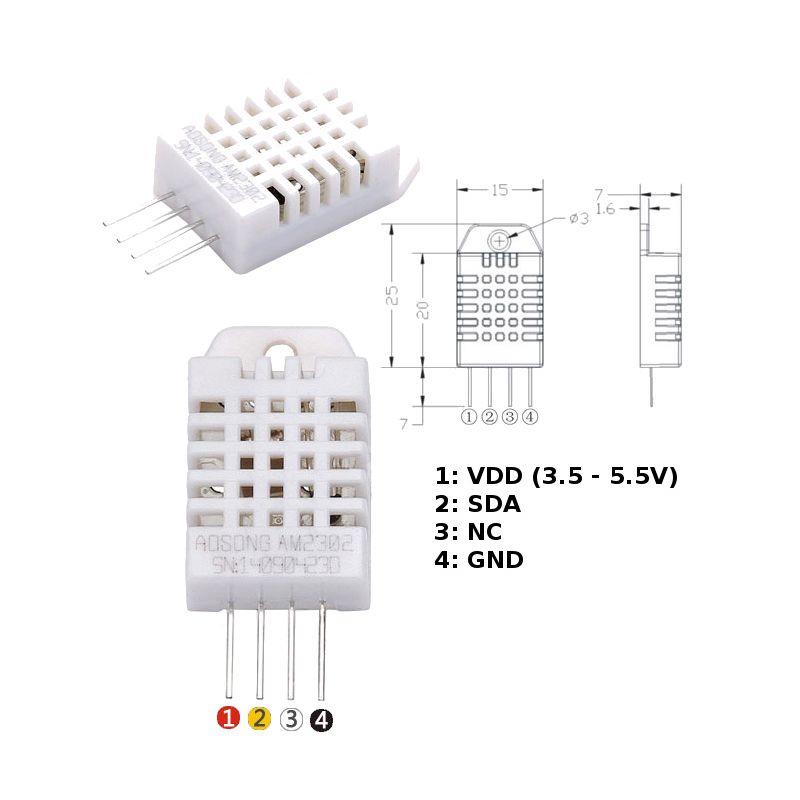
- 크기 : 25 * 15 * 7mm
- 전압 : 3.5-5.5V
- 포트 : 디지털 양방향 단일 버스
- 온도 범위 : -40-80 ℃ ± 0.5 ℃
- 습도 범위 : 20~90% RH ± 2 % RH
DHT22 데이터 쉬트
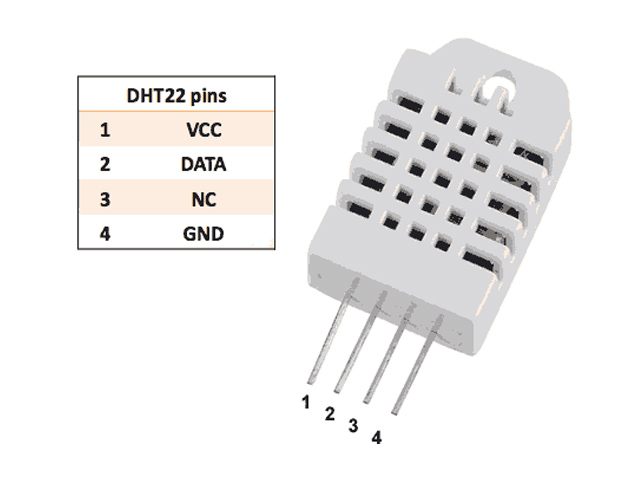
핀 맵과 연결도는 아래와 같다.
- 파일 이름: get-humitemp.c
- 소스코드: 할당된 gpio 번호는 예고없이 변경할 수 있습니다.
코드는 아래와 같다. 라즈베리파이4 에서 이전 코드는 온도 습도 결과가 여러줄이 나와 가장 아래의 코드를 수정하였다.
/*
 *      dht22.c:
 *	Simple test program to test the wiringPi functions
 *	Based on the existing dht11.c
 *	Amended by technion@lolware.net
 */

#include <wiringPi.h>

#include <stdio.h>
#include <stdlib.h>
#include <stdint.h>
#include <sys/types.h>
#include <unistd.h>

#define MAXTIMINGS 85
//static int DHTPIN = 21;
//static int DHTPIN = 7;

static int DHTPIN = 11;
static int dht22_dat[5] = {0,0,0,0,0};

static uint8_t sizecvt(const int read)
{
  /* digitalRead() and friends from wiringpi are defined as returning a value
  < 256. However, they are returned as int() types. This is a safety function */

  if (read > 255 || read < 0)
  {
    printf("Invalid data from wiringPi library\n");
    exit(EXIT_FAILURE);
  }
  return (uint8_t)read;
}

static int read_dht22_dat()
{
  uint8_t laststate = HIGH;
  uint8_t counter = 0;
  uint8_t j = 0, i;

  dht22_dat[0] = dht22_dat[1] = dht22_dat[2] = dht22_dat[3] = dht22_dat[4] = 0;

  // pull pin down for 18 milliseconds
  pinMode(DHTPIN, OUTPUT);
  digitalWrite(DHTPIN, HIGH);
  delay(10);
  digitalWrite(DHTPIN, LOW);
  delay(18);
  // then pull it up for 40 microseconds
  digitalWrite(DHTPIN, HIGH);
  delayMicroseconds(40);
  // prepare to read the pin
  pinMode(DHTPIN, INPUT);

  // detect change and read data
  for ( i=0; i< MAXTIMINGS; i++) {
    counter = 0;
    while (sizecvt(digitalRead(DHTPIN)) == laststate) {
      counter++;
      delayMicroseconds(1);
      if (counter == 255) {
        break;
      }
    }
    laststate = sizecvt(digitalRead(DHTPIN));

    if (counter == 255) break;

    // ignore first 3 transitions
    if ((i >= 4) && (i%2 == 0)) {
      // shove each bit into the storage bytes
      dht22_dat[j/8] <<= 1;
      if (counter > 16)
        dht22_dat[j/8] |= 1;
      j++;
    }
  }

  // check we read 40 bits (8bit x 5 ) + verify checksum in the last byte
  // print it out if data is good
  if ((j >= 40) &&
      (dht22_dat[4] == ((dht22_dat[0] + dht22_dat[1] + dht22_dat[2] + dht22_dat[3]) & 0xFF)) ) {
        float t, h;
        h = (float)dht22_dat[0] * 256 + (float)dht22_dat[1];
        h /= 10;
        t = (float)(dht22_dat[2] & 0x7F)* 256 + (float)dht22_dat[3];
        t /= 10.0;
        if ((dht22_dat[2] & 0x80) != 0)  t *= -1;


    printf("Humidity = %.2f %% Temperature = %.2f *C \n", h, t );
    return 1;
  }
  else
  {
    printf("Data not good, skip\n");
    return 0;
  }
}

//int main (int argc, char *argv[])
int main (void)
{

  if (wiringPiSetup() == -1)
    exit(EXIT_FAILURE) ;

  if (setuid(getuid()) < 0)
  {
    perror("Dropping privileges failed\n");
    exit(EXIT_FAILURE);
  }


  while(1){
  read_dht22_dat();
  //while (read_dht22_dat() == 0)
  //{
     //delay(1000); // wait 1sec to refresh
  //}
  delay(3000);
  }


  return 0 ;
}
'개발자 > 라즈베리파이4' 카테고리의 다른 글
| 라즈베리파이4 한글 완벽 설치 (0) | 2022.06.09 |
|---|---|
| 라즈베리파이4 센서 8종 테스트 코드 C언어 (0) | 2022.06.09 |
| 라즈베리파이 4 워터 펌프 코드 (0) | 2022.06.08 |
| 라즈베리파이4 소리 센서, 사운드 센서 실습 (0) | 2022.06.07 |
| mq135 air quality sensor 라즈베리파이 4 공기질 센서 (0) | 2022.05.30 |
| 라즈베리파이4 화염 불꽃 감지 센서 모듈 Flame Sensor (4) | 2022.05.27 |
| 라즈베리파이 4 조도 센서, 빛 센서 실습 (0) | 2022.05.25 |
| 라즈베리파이 4 근접 센서 실습 코드 (0) | 2022.05.23 |
취업, 창업의 막막함, 외주 관리, 제품 부재!
당신의 고민은 무엇입니까? 현실과 동떨어진 교육, 실패만 반복하는 외주 계약,
아이디어는 있지만 구현할 기술이 없는 막막함.
우리는 알고 있습니다. 문제의 원인은 '명확한 학습, 실전 경험과 신뢰할 수 있는 기술력의 부재'에서 시작됩니다.
이제 고민을 멈추고, 캐어랩을 만나세요!
코딩(펌웨어), 전자부품과 디지털 회로설계, PCB 설계 제작, 고객(시장/수출) 발굴과 마케팅 전략으로 당신을 지원합니다.
제품 설계의 고수는 성공이 만든 게 아니라 실패가 만듭니다. 아이디어를 양산 가능한 제품으로!
귀사의 제품을 만드세요. 교육과 개발 실적으로 신뢰할 수 있는 파트너를 확보하세요.
캐어랩


