반응형
하드웨어 준비물
ESP32 C3 슈퍼 미니
전원 스위치 40개
나사 + 삽입체 30개
TZT OLES IIC 0.96인치
로딩 보드 5V 리튬 배터리
촉각 푸시 버튼 10개 5V 승압
회로 연결도
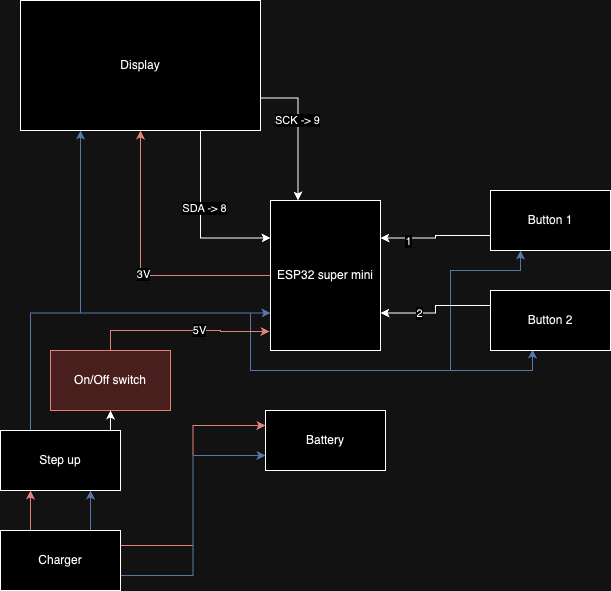
다른 이페이퍼를 이용한 포모도로 시계 프로젝트 깃 허브 링크 - 이 프로젝트 상세 설명 페이지
VS Code 환경 소스코드 참고 - 링크
#include <Adafruit_GFX.h>
#include <Adafruit_SSD1306.h>
#include <Arduino.h>
#include <Ticker.h>
#include <Wire.h>

#define SCREEN_WIDTH 128  // OLED display width, in pixels
#define SCREEN_HEIGHT 64  // OLED display height, in pixels

// Declaration for an SSD1306 display connected to I2C (SDA, SCL pins)
Adafruit_SSD1306 display(SCREEN_WIDTH, SCREEN_HEIGHT, &Wire, -1);

#define OLED_RESET -1
uint32_t workTime = 60 * 25 + 1;
uint32_t breakTime = 60 * 5 + 1;
Ticker tkSec;
uint32_t remainingTime = workTime;
bool work = true;
bool running = false;
bool startStopLastState = false;
const unsigned char playPauseBitmap[] PROGMEM = {
    0x00, 0x00, 0x41, 0x80, 0xf0, 0x00, 0x41, 0x80, 0xfc, 0x00, 0x41, 0x80,
    0xce, 0x00, 0x41, 0x80, 0xc3, 0x80, 0x41, 0x80, 0xc0, 0xe0, 0x41, 0x80,
    0xc0, 0x70, 0x41, 0x80, 0xc0, 0x1c, 0x41, 0x80, 0xc0, 0x0c, 0x41, 0x80,
    0xc0, 0x38, 0x41, 0x80, 0xc0, 0x70, 0x41, 0x80, 0xc1, 0xc0, 0x41, 0x80,
    0xc7, 0x80, 0x41, 0x80, 0xce, 0x00, 0x41, 0x80, 0xf8, 0x00, 0x41, 0x80,
    0xe0, 0x00, 0x41, 0x80, 0x00, 0x00, 0x41, 0x80};
const unsigned char resetBitmap[] PROGMEM = {
    0x00, 0x00, 0x00, 0x00, 0x00, 0x00, 0x00, 0x00, 0x00, 0x00, 0x00, 0x00,
    0x00, 0x3e, 0x30, 0x00, 0x00, 0xff, 0xf0, 0x00, 0x03, 0xe3, 0xf0, 0x00,
    0x07, 0x00, 0xf8, 0x00, 0x06, 0x00, 0xf8, 0x00, 0x0c, 0x00, 0x00, 0x00,
    0x0c, 0x00, 0x00, 0x00, 0x1c, 0x00, 0x00, 0x00, 0x18, 0x00, 0x00, 0x00,
    0x18, 0x00, 0x0c, 0x00, 0x18, 0x00, 0x0c, 0x00, 0x1c, 0x00, 0x0c, 0x00,
    0x0c, 0x00, 0x18, 0x00, 0x0c, 0x00, 0x18, 0x00, 0x06, 0x00, 0x30, 0x00,
    0x07, 0x00, 0x70, 0x00, 0x03, 0xc1, 0xe0, 0x00, 0x00, 0xff, 0x80, 0x00,
    0x00, 0x3e, 0x00, 0x00, 0x00, 0x00, 0x00, 0x00, 0x00, 0x00, 0x00, 0x00,
    0x00, 0x00, 0x00, 0x00};

void everySecond() {
  Serial.println("Tick");
  if (running) {
    Serial.println("Running");
    if (remainingTime && --remainingTime == 0) {
      if (work) {
        work = false;
        remainingTime = breakTime;
      } else {
        running = false;
      }
    } else {
      display.clearDisplay();
      display.setTextSize(2);
      display.setTextColor(WHITE);
      display.setCursor(0, 10);
      // Display left time in mm:ss
      if (work) {
        display.println("HUSSLE");
      } else {
        display.println("CHILL");
      }
      display.setCursor(0, 40);
      display.setTextSize(3);
      if (remainingTime < 600) {
        display.print("0");
        display.print(remainingTime / 60);
      } else {
        display.print(remainingTime / 60);
      }
      display.print(":");
      if (remainingTime % 60 < 10) {
        display.print("0");
      }
      display.println(remainingTime % 60);
      display.drawBitmap(100, 10, playPauseBitmap, 25, 17, WHITE);
      display.drawBitmap(100, 40, resetBitmap, 25, 25, WHITE);
      display.display();
    }
  }
}

void setup() {
  Serial.begin(9600);
  while (!Serial)
    ;
  Serial.println("Pomodoro Timer");

  if (!display.begin(SSD1306_SWITCHCAPVCC, 0x3C)) {  // Address 0x3D for 128x64
    Serial.println(F("SSD1306 allocation failed"));
    for (;;)
      ;
  }
  tkSec.attach(1, everySecond);
  display.clearDisplay();

  Serial.println("Reset");
  running = true;
  work = true;
  remainingTime = workTime;
  everySecond();
  running = false;
  pinMode(1, INPUT_PULLUP);
  pinMode(2, INPUT_PULLUP);
}

void loop() {
  int startStop = digitalRead(1);
  int reset = digitalRead(2);

  // reset
  if (reset == LOW) {
    running = true;
    work = true;
    remainingTime = workTime;
    everySecond();
    delay(10);
  }

  // start/stop
  if (startStop == LOW && startStopLastState == HIGH) {
    Serial.println("Start/Stop");
    running = !running;
  }
  startStopLastState = startStop;
}
반응형
'ESP32 Project' 카테고리의 다른 글
| ESP32-C3 및 LED 매트릭스를 활용한 디지털 모래시계 (0) | 2026.03.01 |
|---|---|
| ESP32와 Arduino 코어를 이용한 OLED 애니메이션 구현 (0) | 2026.02.24 |
| 영원한 메이커의 고향, 시계 ESPclock 스마트 시계 (1) | 2026.02.24 |
| ESP32-CAM 보드에서 YOLO를 구현 (0) | 2026.02.04 |
| ESP32-CAM 영상 물체 탐지 기능 구현 웨비나 (1) | 2026.01.28 |
| ESP32의 OTA 업데이트는 쉬워 보이지만 (1) | 2026.01.12 |
| 와이파이를 동작 감지 센서로 바꾸는 방법 (2) | 2025.12.30 |
| ESP32를 사용한 간단한 GPS 추적기 제작 방법 및 지도 상의 데이터 시각화 (0) | 2025.11.17 |
취업, 창업의 막막함, 외주 관리, 제품 부재!
당신의 고민은 무엇입니까? 현실과 동떨어진 교육, 실패만 반복하는 외주 계약,
아이디어는 있지만 구현할 기술이 없는 막막함.
우리는 알고 있습니다. 문제의 원인은 '명확한 학습, 실전 경험과 신뢰할 수 있는 기술력의 부재'에서 시작됩니다.
이제 고민을 멈추고, 캐어랩을 만나세요!
코딩(펌웨어), 전자부품과 디지털 회로설계, PCB 설계 제작, 고객(시장/수출) 발굴과 마케팅 전략으로 당신을 지원합니다.
제품 설계의 고수는 성공이 만든 게 아니라 실패가 만듭니다. 아이디어를 양산 가능한 제품으로!
귀사의 제품을 만드세요. 교육과 개발 실적으로 신뢰할 수 있는 파트너를 확보하세요.
캐어랩


