영화 매트릭스에서 영감을 받은 디지털 레인 클락
이 터치 지원 탁상시계는 애니메이션으로 구현된 디지털 비 효과를 통해 분위기 있고 시선을 사로잡는 방식으로 시간을 확인할 수 있도록 해줍니다.
이 프로젝트에 사용된 것들
Adafruit 2.8인치 TFT LCD 캡 터치 브레이크아웃 보드 (EYESPI 커넥터 포함)
Adafruit EYESPI 브레이크아웃 보드
아두이노 나노 ESP32
기계 나사, M3
사이즈 M3x4
개요
디지털 비, 또는 "매트릭스 코드"는 영화 매트릭스 시리즈 전반에 걸쳐 등장하는 애니메이션 효과입니다. 특유의 녹색과 사이버펑크적인 분위기로 대중문화의 상징적인 요소가 되었습니다.
이 시각 효과에서는 무작위 텍스트 문자들이 이미지 프레임 상단에서 끊임없이 쏟아져 내립니다. 떨어지는 수많은 물방울의 흐름과 그 뒤에 남는 색채는 보는 이를 사로잡습니다.

이 프로젝트는 디지털 빗줄기 배경에 시간을 표시하는 탁상시계를 만드는 방법을 보여줍니다. 사용자는 빗소리를 배경으로 시계를 감상하고 터치 조작을 통해 시간을 설정하고 배경색을 변경할 수 있습니다.
시계 기능
디지털 강우시계는 실용적인 시간 표시와 역동적이고 시선을 사로잡는 시각화를 결합하여 기능적인 탁상용 액세서리로 디자인되었습니다.
이 제품은 맞춤형 3D 프린팅 스탠드에 장착된 터치스크린 디스플레이와 통합 제어 전자 장치를 특징으로 합니다. 이러한 전자 장치는 메이커 스타일의 미학을 강조하기 위해 의도적으로 화면 뒤에 노출되어 있습니다.
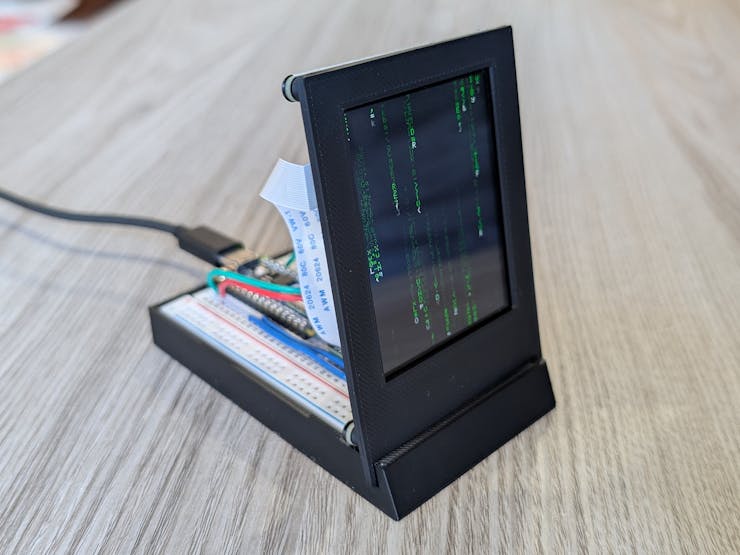
USB를 통해 전원이 공급되면, 시계는 무작위로 생성된 문자들이 다양한 속도로 화면 아래로 수직으로 쏟아지는 디지털 비 애니메이션을 표시합니다.
매분 정각이 되면 현재 시간이 화면 중앙에 표시됩니다. 몇 초 후, 디지털 비가 내리듯 숫자가 서서히 사라지면서 그 위에 디지털 숫자가 겹쳐집니다. 화면 중앙을 탭하면 다시 시간이 표시됩니다.
현재 시간을 조정하려면 오른쪽 상단 모서리를 탭하여 시와 분 값을 변경할 수 있는 터치 컨트롤 메뉴가 열리도록 하면 됩니다. 같은 모서리를 다시 탭하면 메뉴가 닫히고 업데이트된 시간이 표시됩니다.
화면 왼쪽 하단을 탭하면 디지털 비와 시간의 색상이 업데이트됩니다. 탭할 때마다 녹색, 빨간색, 파란색, 노란색, 보라색 순으로 색상이 순환됩니다.
하드웨어 구성 요소
이 디지털 시계는 여러 전자 부품과 3D 프린팅으로 제작된 구조용 받침대로 구성되어 있습니다.

Adafruit 2.8인치 TFT 브레이크아웃 보드가 시계 화면을 표시하는 디스플레이로 사용됩니다. 이 보드에는 240x320 픽셀의 풀 컬러 디스플레이와 사용자의 터치를 감지하는 정전식 터치스크린이 포함되어 있습니다.
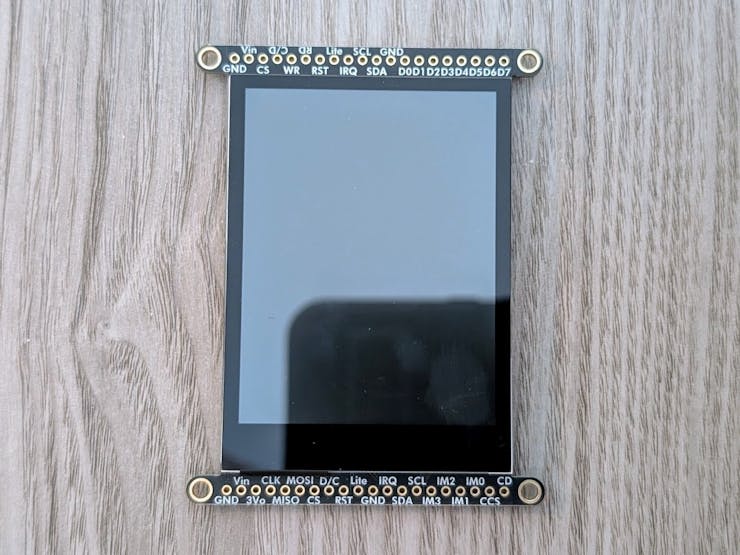
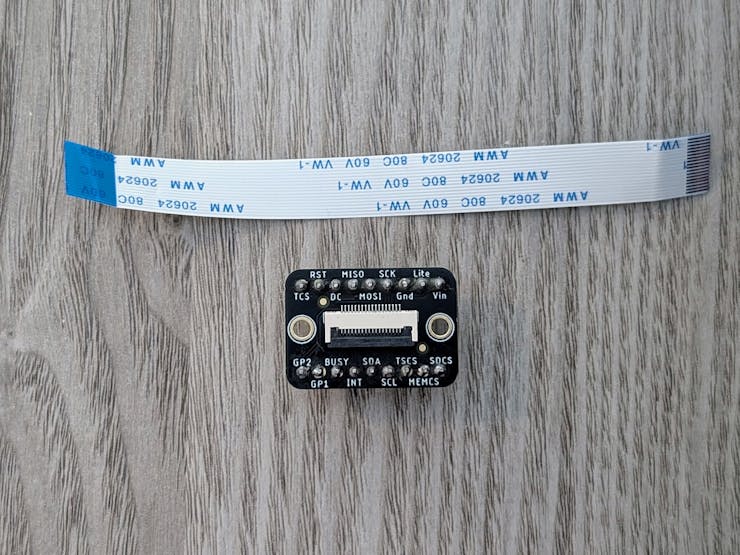
EYESPI는 Adafruit에서 자사 디스플레이의 배선을 간소화하기 위해 개발한 연결 표준으로, 여러 개의 점퍼 와이어를 하나의 유연한 리본 케이블로 대체합니다.
이 표준은 18핀 FPC를 통해 TFT 디스플레이를 Adafruit EYESPI 브레이크아웃 보드 에 연결하여 사용합니다 . 이 보드는 온보드 헤더 핀을 통해 디스플레이의 SPI, 백라이트, 전원 및 터치 인터럽트 핀을 제공합니다.
아두이노 나노 ESP32는 시계의 주요 프로세서 및 전원 역할을 합니다. EYESPI 브레이크아웃 보드를 통해 디스플레이에 연결되며, 맞춤형 펌웨어를 실행하여 비 애니메이션을 관리하고, 시계 타이밍을 유지하며, 터치스크린 입력을 처리합니다.

나노 마이크로컨트롤러와 EYSPI 브레이크아웃 보드는 스탠드 받침대 내부에 있는 브레드보드에 연결되어 있으며, 디스플레이는 스탠드 전면부에 장착됩니다. 스탠드 전면부는 받침대의 슬롯에 압착식으로 고정됩니다.
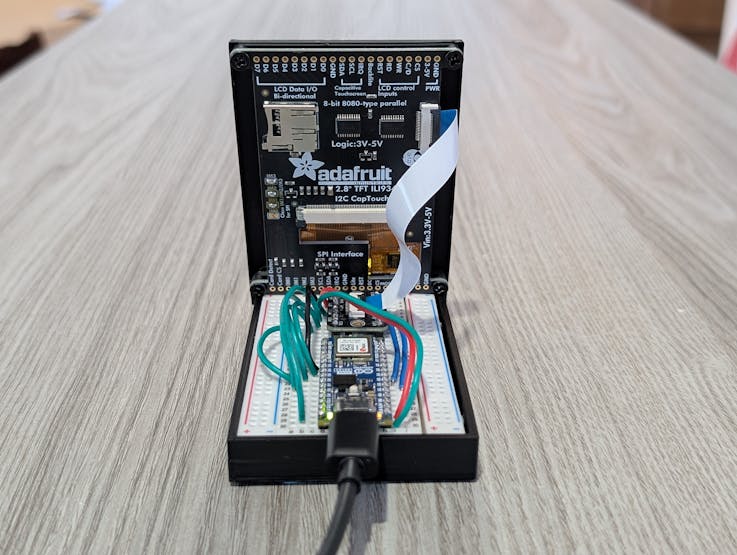
조립이 완료되면 Nano ESP32는 USB-C 포트를 통해 전원이 공급되며, 이 포트는 디스플레이에 전원을 공급하고 시계 펌웨어를 초기화합니다.
조립 설명서
다음은 디지털 강우시계를 제작하고 프로그래밍하는 방법에 대한 설명입니다. 이 설명은 아두이노 나노 ESP32와 아두이노 IDE에 대한 기본적인 사용법을 알고 있다는 전제하에 작성되었습니다.
프로젝트 코드 전체와 3D 프린팅 파일은 이 프로젝트의 첨부 파일과 GitHub 에서 찾을 수 있습니다 .
하드웨어 설정
먼저 시계의 전자 부품을 조립하고 맞춤형 스탠드 안에 설치하는 것으로 제작을 시작하세요.
1. 시계 받침대를 3D 프린터로 출력하세요.
이 스탠드는 받침대와 전면판, 두 개의 분리된 부분으로 구성됩니다. 두 부분 모두에 대한 3D 모델 파일(.stl)은 이 프로젝트의 첨부 파일에 제공됩니다.
PLA는 이러한 출력물에 권장되는 재료입니다.
2. TFT 디스플레이의 점퍼 패드를 납땜합니다.
EYESPI 커넥터를 통한 통신을 활성화하려면 TFT 디스플레이의 하드웨어 모드 선택 점퍼를 3.3V에 연결하여 SPI 모드로 설정해야 합니다.
납땜 인두를 사용하여 브레이크아웃 보드 뒷면에 있는 IM1, IM2, IM3 패드 사이에 납땜 브리지를 만드십시오 . 이 점퍼들을 연결하면 디스플레이가 올바른 통신 표준에 맞게 구성됩니다.
3. 전자 회로를 제작하십시오.
아두이노 나노ESP32와 EYESPI 브레이크아웃 보드를 400핀 무납땜 브레드보드에 장착한 다음, 점퍼 와이어를 사용하여 아래 회로도에 표시된 대로 핀 연결을 만드세요.

브레드보드 레이아웃은 다음과 같아야 합니다.

4. 전자 부품을 장착합니다.
브레드보드를 베이스의 홈에 끼웁니다. 그런 다음 TFT 터치스크린 장착 구멍을 페이스플레이트 스탠드오프에 맞춰 정렬하고 M3x4 나사 4개로 고정합니다.
5. 디스플레이 배선 및 조립을 완료합니다.
EYESPI 케이블을 사용하여 TFT 터치스크린을 전자 장치에 연결합니다. FPC의 한쪽 끝을 터치스크린 뒷면의 플립탑 커넥터에 삽입하고, 다른 쪽 끝을 EYESPI 브레이크아웃 보드의 커넥터에 삽입합니다.
다음으로, 스탠드의 앞면 판의 아래쪽 가장자리를 받침대의 홈에 끼워 넣어 두 부분을 결합합니다.
이 단계를 모두 완료하면 하드웨어 조립이 완료되어 펌웨어 업로드 준비가 완료됩니다.
펌웨어 설정
시계는 기기의 전원이 켜질 때마다 아두이노 나노 ESP32에서 실행되는 맞춤형 아두이노 스케치에 의해 구동됩니다.
이 펌웨어는 그래픽 사용자 인터페이스 그리기, 디지털 비 애니메이션 구현, 정확한 타이밍 계산, 사용자 터치 입력 해석 등 모든 장치 기능을 관리합니다. 이 펌웨어를 실행하려면 Nano ESP32가 올바르게 구성되어 있어야 하고 Arduino 스케치가 업로드되어 있어야 합니다.
1. 필요한 아두이노 라이브러리를 설치합니다.
아두이노 코드가 TFT 디스플레이에 그림을 그리거나 터치 입력을 처리하는 등의 복잡한 동작을 수행하려면 여러 외부 라이브러리에서 제공하는 추가 코드에 접근해야 합니다. 아두이노 IDE에서 라이브러리 관리자 (도구 -> 라이브러리 관리)를 열고 다음 라이브러리를 검색하여 설치하세요.
- Adafruit GFX 라이브러리 - 도형 및 텍스트를 위한 핵심 그래픽 제공 도구입니다.
- Adafruit ILI9341 - 2.8인치 TFT 디스플레이용 드라이버입니다.
- Adafruit FT6206 라이브러리 - 정전식 터치스크린용 드라이버입니다.
- ESP32Time - ESP32의 내부 실시간 시계를 관리하는 라이브러리입니다.
참고: Adafruit BusIO와 같은 종속성 설치 메시지가 표시되면 모든 기능이 올바르게 작동하도록 "모두 설치"를 선택하십시오.
2. 펌웨어 업로드
이 프로젝트 첨부 파일에 있는 GitHub 저장소에서 DigitalRainClock.ino 스케치를 다운로드하고 Arduino IDE에서 엽니다.
ESP32 나노 보드를 USB-C 케이블로 컴퓨터에 연결합니다. IDE의 도구 메뉴에서 보드가 'Arduino Nano ESP32'로 설정되어 있고 해당 포트가 선택되어 있는지 확인합니다. 업로드 화살표를 클릭하여 코드를 컴파일하고 보드에 전송합니다.
업로드 후 스케치는 아두이노 나노 ESP32에 전원이 공급될 때마다 자동으로 실행됩니다.
이 조립 설명서를 모두 따라하면 작동하는 디지털 시계를 완성하여 책상 위에 전시하고 기능적인 장식품으로 활용할 수 있습니다.
디지털 시계 회로도

전체 코드를 아래에 나타낸다. 다음 저장소를 확인한다.
GitHub 저장소 아두이노 스케치, FreeCad 프로젝트 및 이미지가 포함된 GitHub 저장소
전체 코드 - 코드 아래에 이글 말고 새로 발견한 참고 링크를 추가한다.
#include <Wire.h>
#include <Adafruit_FT6206.h>
#include <Adafruit_GFX.h>
#include <Adafruit_ILI9341.h>
#include <ESP32Time.h>

// TFT Pins for Nano ESP32
// D11 -> MOSI
// D13 -> SCK
// A4 -> SDA
// A5 -> SCL
#define TFT_DC   2
#define TFT_RST  3
#define TFT_CS   4
#define TFT_LED  5

// Initialize the display object
Adafruit_ILI9341 tft = Adafruit_ILI9341(TFT_CS, TFT_DC, TFT_RST);

// Initialize the capacitive touchscreen object
Adafruit_FT6206 ctp;

// Screen dimensions - portrait
const int SCREEN_W = 240;
const int SCREEN_H = 320;

// Text scale
const int TEXT_SCALE = 1;

// Font pixel width and height
const int FONT_PIXEL_W = 6;
const int FONT_PIXEL_H = 8;
const int CHAR_W = FONT_PIXEL_W * TEXT_SCALE;
const int CHAR_H = FONT_PIXEL_H * TEXT_SCALE;

// Number of columns and rows
const int NUM_COLS = SCREEN_W / CHAR_W;
const int NUM_ROWS = SCREEN_H / CHAR_H;

// Column-specific tail length range (in rows)
const int MIN_TAIL_LEN = 14;
const int MAX_TAIL_LEN = 20;

// Global speed range (ms per row step)
const uint16_t MIN_INTERVAL = 60;
const uint16_t MAX_INTERVAL = 160;

// Clock overlay parameters
const int  TIME_TEXT_LENGTH          = 5;
const uint16_t TIME_OVERLAY_DURATION_MS = 3600;
const int TIME_TEXT_SIZE        = 6;
char timeText[TIME_TEXT_LENGTH + 1] = "12:00";

// Column state
struct ColumnState {
  int headRow;
  uint16_t intervalMs;
  uint32_t lastUpdateMs;
  uint8_t tailLength;
};

// Array of column states
ColumnState columns[NUM_COLS];

// Character buffer for trail characters
char glyphs[NUM_COLS][NUM_ROWS];

// Colors for rain (head + trail levels) and background
uint16_t matrixHeadColor;
uint16_t matrixTrailBright;
uint16_t matrixTrailDim;
uint16_t matrixTrailDark;
uint16_t matrixBgColor;

// Real-time clock
ESP32Time rtc;

// Last displayed minute
int lastDisplayedMinute = -1;

// Color scheme struct
struct ColorScheme {
  uint16_t head;
  uint16_t bright;
  uint16_t dim;
  uint16_t dark;
};

// Number of color schemes
const uint8_t NUM_COLOR_SCHEMES = 5;

// Array of color schemes
ColorScheme colorSchemes[NUM_COLOR_SCHEMES];

// Current color scheme
uint8_t currentColorScheme = 0;

// Color toggle region
const int COLOR_TOGGLE_REGION_W = 60;
const int COLOR_TOGGLE_REGION_H = 60;
const uint16_t COLOR_TOGGLE_DEBOUNCE_MS = 250;
uint32_t lastColorToggleMs = 0;

// Brightness toggle region (upper right)
const int BRIGHTNESS_TOGGLE_REGION_W = 60;
const int BRIGHTNESS_TOGGLE_REGION_H = 60;
const uint16_t BRIGHTNESS_TOGGLE_DEBOUNCE_MS = 250;
uint32_t lastBrightnessToggleMs = 0;

// Brightness levels
const uint8_t BRIGHTNESS_LEVELS[] = {20, 40, 60, 80, 100};
const uint8_t NUM_BRIGHTNESS_LEVELS = sizeof(BRIGHTNESS_LEVELS) / sizeof(BRIGHTNESS_LEVELS[0]);

// Current brightness index - default to 100%
uint8_t currentBrightnessIndex = NUM_BRIGHTNESS_LEVELS - 1;

// Settings toggle region
const int SETTINGS_TOGGLE_REGION_W = 60;
const int SETTINGS_TOGGLE_REGION_H = 60;
const uint16_t SETTINGS_TOGGLE_DEBOUNCE_MS = 250;
uint32_t lastSettingsToggleMs = 0;
const uint16_t SETTINGS_BUTTON_DEBOUNCE_MS = 200;
uint32_t lastSettingsButtonMs = 0;

// Time overlay state struct
struct TimeOverlay {
  bool active;
  uint32_t startMs;
  uint32_t endMs;
  bool needsDraw;
};

// Time overlay struct
TimeOverlay overlay = { false, 0, 0, false };

// Settings menu state
bool settingsActive = false;
int settingsHour = 12;
int settingsMinute = 0;

// Button region struct
struct ButtonRegion {
  int x;
  int y;
  int w;
  int h;
};

// Button regions
ButtonRegion hourUpButton = {0};
ButtonRegion hourDownButton = {0};
ButtonRegion minuteUpButton = {0};
ButtonRegion minuteDownButton = {0};

// Settings time display region
int settingsTimeDisplayX = 0;
int settingsTimeDisplayY = 0;
int settingsTimeDisplayW = 0;
int settingsTimeDisplayH = 0;

// Settings menu constants
const int SETTINGS_PANEL_MARGIN = 10;
const int SETTINGS_BUTTON_W = 80;
const int SETTINGS_BUTTON_H = 40;
const int SETTINGS_BUTTON_SPACING = 10;
const int SETTINGS_LABEL_OFFSET = 15;
const int SETTINGS_TIME_TEXT_SIZE = 3;
const int SETTINGS_TITLE_TEXT_SIZE = 2;
const int SETTINGS_TITLE_OFFSET_Y = 25;
const int SETTINGS_BUTTON_VERTICAL_OFFSET = 10;
const int SETTINGS_LABEL_OFFSET_ADJUST = 5;

// Global overlay area bounds
int overlayAreaX, overlayAreaY, overlayAreaW, overlayAreaH;
int startOverlayCol, endOverlayCol;

// Function prototypes
char randomGlyph();
void initColumns();
void resetColumn(int col);
void updateMatrixRain();
void handleTouch();
void updateTimeOverlay();
void calcTimeOverlayArea();
void drawRainChar(int x, int row, char ch, uint16_t color);
void initColorSchemes();
void applyColorScheme(uint8_t index);
void cycleColorScheme();
bool isColorToggleTouch(int x, int y);
bool isSettingsToggleTouch(int x, int y);
void enterSettingsMenu();
void exitSettingsMenu();
void drawSettingsMenu();
void startTimeOverlay(uint32_t now);
void updateTimeTextFromClock();
void checkMinuteTick();
void handleSettingsTouch(int x, int y);
void drawTimeAdjustControls();
void updateSettingsTimeDisplay();
void drawButton(int x, int y, int w, int h, const char *label);
bool pointInRect(int x, int y, int rx, int ry, int rw, int rh);
bool isBrightnessToggleTouch(int x, int y);
void cycleBrightness();
void applyBrightnessIndex(uint8_t idx);

void setup() {
  // Initialize serial communication
  Serial.begin(115200);
  Serial.println("Starting TFT and Touch Initialization...");

  // Backlight control (PWM for brightness)
  pinMode(TFT_LED, OUTPUT);
  applyBrightnessIndex(currentBrightnessIndex);

  // TFT Display Setup
  tft.begin();
  tft.fillScreen(ILI9341_BLACK);

  // Touchscreen Setup
  if (!ctp.begin()) {
    // Display error message if touchscreen initialization fails
    Serial.println("ERROR: Couldn't start FT6206 touchscreen controller.");
    tft.fillScreen(ILI9341_BLACK);
    tft.setTextSize(2);
    tft.setTextWrap(true);
    tft.setTextColor(ILI9341_GREEN, ILI9341_BLACK);
    tft.setCursor(10, 40);
    tft.println("Touchscreen error");
    tft.setTextSize(1);
    tft.println();
    tft.println("FT6206 not detected.");
    tft.println("Check wiring/power,");
    tft.println("then reset board.");

    // Halt: no further action taken
    while (1) {
      delay(1000);
    }
  }
  Serial.println("FT6206 touchscreen initialized successfully.");

  // Set up text parameters for digital rain
  tft.setTextSize(TEXT_SCALE);
  tft.setTextWrap(false);

  // Initialize color schemes and apply the first color scheme
  initColorSchemes();
  applyColorScheme(0);

  // Set the background color
  matrixBgColor = ILI9341_BLACK;
  tft.fillScreen(matrixBgColor);

  // Set initial time
  rtc.setTime(0, 0, 12, 1, 1, 2024);
  updateTimeTextFromClock();

  // Seed random number generator
  randomSeed(analogRead(A0));

  // Initialize digital rain column states and glyphs
  initColumns();

  // Pre-calculate the time overlay area dimensions
  calcTimeOverlayArea();

  // Initialize time overlay
  overlay.active = false;
  lastDisplayedMinute = rtc.getMinute();
  startTimeOverlay(millis());
}

void loop() {
  // Handle touch events
  handleTouch();

  // Check if the minute has changed and update the time text if it has
  checkMinuteTick();

  // If settings are active, do not update the time overlay
  if (settingsActive) {
    return;
  }

  // Update digital rain characters
  updateMatrixRain();

  // Update time overlay
  updateTimeOverlay();
}


// Initialize digital rain columns
void initColumns() {
  // Pre-fill glyphs
  for (int col = 0; col < NUM_COLS; col++) {
    for (int row = 0; row < NUM_ROWS; row++) {
      glyphs[col][row] = randomGlyph();
    }
  }

  // Initialize each column's state
  for (int col = 0; col < NUM_COLS; col++) {
    resetColumn(col);
    // Start headRow somewhere above the visible area so streams "fall in"
    columns[col].headRow = random(-NUM_ROWS, 0);
  }
}

// Reset a digital rain column
void resetColumn(int col) {
  // Get the column state
  ColumnState &c = columns[col];

  // Generate a random tail length for the column
  c.tailLength = random(MIN_TAIL_LEN, MAX_TAIL_LEN + 1);  // inclusive range

  // Map tail length to speed: shorter tail => smaller interval => faster, longer tail => larger interval => slower
  int tailSpan = MAX_TAIL_LEN - MIN_TAIL_LEN;
  if (tailSpan < 1) tailSpan = 1; // Avoid division by zero

  // Generate a base interval for the column
  uint16_t baseInterval = MIN_INTERVAL +
    (uint16_t)((long)(c.tailLength - MIN_TAIL_LEN) * (MAX_INTERVAL - MIN_INTERVAL) / tailSpan);

  // Add a little jitter so similar tails aren't perfectly identical to avoid repetition
  int16_t jitter = random(-15, 16); // -15 .. +15
  int32_t intervalWithJitter = (int32_t)baseInterval + jitter;
  if (intervalWithJitter < 20) intervalWithJitter = 20; // Clamp to sane minimum to avoid too fast falling

  // Set the interval for the column
  c.intervalMs   = (uint16_t)intervalWithJitter;
  c.lastUpdateMs = millis();

  // Set the last update time for the column
  c.lastUpdateMs = millis();
}

// Generate a random glyph
char randomGlyph() {
  // Random printable ASCII; tweak range if you want other characters
  return (char)random(33, 126); // '!' to '~'
}

// Calculate the time overlay area once
void calcTimeOverlayArea() {
  int charPixelW = FONT_PIXEL_W * TIME_TEXT_SIZE;
  int charPixelH = FONT_PIXEL_H * TIME_TEXT_SIZE;
  int textPixelW = TIME_TEXT_LENGTH * charPixelW;

  // Calculate the padding size: 1 font-pixel row + 2 extra pixels to avoid text being cut off
  int vPad = (1 * TIME_TEXT_SIZE) + 2;

  // Calculate the x position of the time overlay
  int tx = (SCREEN_W - textPixelW) / 2;
  if (tx < 0) tx = 0;

  // Calculate the y position of the time overlay
  int ty = (SCREEN_H - charPixelH) / 2;
  if (ty < 0) ty = 0;

  // Store the time overlay area dimensions globally
  overlayAreaX = tx;
  overlayAreaY = ty - vPad;
  overlayAreaW = textPixelW - 1;
  overlayAreaH = charPixelH + vPad;

  // Calculate which columns intersect with this X-range for optimization
  // Column width is CHAR_W
  startOverlayCol = overlayAreaX / CHAR_W;
  endOverlayCol   = (overlayAreaX + overlayAreaW) / CHAR_W;
}

// Initialize color schemes
void initColorSchemes() {
  // Color scheme 0: Green
  colorSchemes[0] = {
    ILI9341_WHITE,
    ILI9341_GREEN,
    ILI9341_DARKGREEN,
    tft.color565(0, 70, 0)
  };

  // Color scheme 1: Red
  colorSchemes[1] = {
    tft.color565(255, 220, 220),
    ILI9341_RED,
    tft.color565(120, 0, 0),
    tft.color565(60, 0, 0)
  };

  // Color scheme 2: Blue
  colorSchemes[2] = {
    tft.color565(220, 240, 255),
    tft.color565(0, 180, 255),
    tft.color565(0, 90, 170),
    tft.color565(0, 40, 90)
  };

  // Color scheme 3: Yellow
  colorSchemes[3] = {
    tft.color565(255, 255, 210),
    ILI9341_YELLOW,
    tft.color565(180, 140, 0),
    tft.color565(120, 90, 0)
  };

  // Color scheme 4: Purple
  colorSchemes[4] = {
    tft.color565(240, 210, 255),
    ILI9341_MAGENTA,
    tft.color565(120, 0, 150),
    tft.color565(70, 0, 90)
  };
}

// Apply a color scheme
void applyColorScheme(uint8_t index) {
  // If the index is out of bounds, set it to 0
  if (index >= NUM_COLOR_SCHEMES) {
    index = 0;
  }

  // Set the current color scheme
  currentColorScheme = index;

  // Set the color scheme colors to the global variables
  matrixHeadColor   = colorSchemes[index].head;
  matrixTrailBright = colorSchemes[index].bright;
  matrixTrailDim    = colorSchemes[index].dim;
  matrixTrailDark   = colorSchemes[index].dark;
}

// Cycle through the color schemes
void cycleColorScheme() {
  uint8_t next = (currentColorScheme + 1) % NUM_COLOR_SCHEMES;
  applyColorScheme(next);
  if (overlay.active) {
    overlay.needsDraw = true;
  }
}

// Check if the color toggle is touched
bool isColorToggleTouch(int x, int y) {
  return (x >= (SCREEN_W - COLOR_TOGGLE_REGION_W)) &&
         (y >= (SCREEN_H - COLOR_TOGGLE_REGION_H));
}

// Check if the settings toggle is touched
bool isSettingsToggleTouch(int x, int y) {
  return (x <= SETTINGS_TOGGLE_REGION_W) && (y <= SETTINGS_TOGGLE_REGION_H);
}

// Enter the settings menu
void enterSettingsMenu() {
  settingsActive = true;
  settingsHour = rtc.getHour(true);
  settingsMinute = rtc.getMinute();
  tft.fillScreen(matrixBgColor);
  drawSettingsMenu();
}

// Exit the settings menu
void exitSettingsMenu() {
  // Set the settings active flag to false
  settingsActive = false;

  // Get the current time
  int currentYear = rtc.getYear();
  int currentMonth = rtc.getMonth() + 1; // Month is 0-11, so add 1
  int currentDay = rtc.getDay();

  // Set the time to the current time
  rtc.setTime(0, settingsMinute, settingsHour, currentDay, currentMonth, currentYear);
  lastDisplayedMinute = settingsMinute;
  updateTimeTextFromClock();

  // Fill the screen with the background color
  tft.fillScreen(matrixBgColor);
  initColumns();

  // Reset the time overlay
  overlay.active = false;
  overlay.needsDraw = false;

  // Start the time overlay
  startTimeOverlay(millis());
}

// Draw the settings menu
void drawSettingsMenu() {
  // Set the text size and wrap and color
  tft.setTextSize(SETTINGS_TITLE_TEXT_SIZE);
  tft.setTextWrap(true);
  tft.setTextColor(matrixTrailBright, matrixBgColor);

  // Calculate the panel x, y, width and height
  int panelX = SETTINGS_PANEL_MARGIN;
  int panelY = SETTINGS_PANEL_MARGIN;
  int panelW = SCREEN_W - (SETTINGS_PANEL_MARGIN * 2);
  int panelH = SCREEN_H - (SETTINGS_PANEL_MARGIN * 2);

  // Draw the panel
  tft.drawRect(panelX, panelY, panelW, panelH, matrixTrailBright);

  // Draw the title
  const char *title = "Current Time";
  int titleWidth = strlen(title) * FONT_PIXEL_W * SETTINGS_TITLE_TEXT_SIZE;
  int titleX = panelX + (panelW - titleWidth) / 2;
  int titleY = panelY + SETTINGS_TITLE_OFFSET_Y;
  tft.setCursor(titleX, titleY);
  tft.println(title);

  // Draw the time adjust controls
  drawTimeAdjustControls();
}


// Draw the time adjust controls
void drawTimeAdjustControls() {
  // Calculate the panel x, y, width and height
  int panelX = SETTINGS_PANEL_MARGIN;
  int panelY = SETTINGS_PANEL_MARGIN;
  int panelW = SCREEN_W - (SETTINGS_PANEL_MARGIN * 2);

  // Calculate the time display x, y, width and height
  settingsTimeDisplayX = panelX + 20;
  settingsTimeDisplayY = panelY + 65;
  settingsTimeDisplayW = panelW - 40;
  settingsTimeDisplayH = 60;

  // Draw the time display
  tft.drawRect(settingsTimeDisplayX, settingsTimeDisplayY, settingsTimeDisplayW, settingsTimeDisplayH, matrixTrailBright);
  updateSettingsTimeDisplay();

  // Calculate the controls top
  int controlsTop = settingsTimeDisplayY + settingsTimeDisplayH + 30 + SETTINGS_LABEL_OFFSET_ADJUST;

  // Calculate the hour column x and minute column x
  int hourColumnX = panelX + 30;
  int minuteColumnX = panelX + panelW - SETTINGS_BUTTON_W - 30;

  // Set the text size
  tft.setTextSize(2);

  // Draw the hour label and minute label
  const char *hourLabel = "Hour";
  const char *minuteLabel = "Minute";
  int hourLabelWidth = strlen(hourLabel) * FONT_PIXEL_W * 2;
  int minuteLabelWidth = strlen(minuteLabel) * FONT_PIXEL_W * 2;

  // Calculate the hour label x and minute label x
  int hourLabelX = hourColumnX + (SETTINGS_BUTTON_W - hourLabelWidth) / 2;
  int minuteLabelX = minuteColumnX + (SETTINGS_BUTTON_W - minuteLabelWidth) / 2;

  // Calculate the label y
  int labelY = controlsTop - SETTINGS_LABEL_OFFSET;

  // Draw the hour label and minute label
  tft.setCursor(hourLabelX, labelY);
  tft.println(hourLabel);
  tft.setCursor(minuteLabelX, labelY);
  tft.println(minuteLabel);

  // Calculate the button top
  int buttonTop = controlsTop + SETTINGS_BUTTON_VERTICAL_OFFSET + SETTINGS_LABEL_OFFSET_ADJUST;

  // Calculate the hour up button x, y, width and height
  hourUpButton = { hourColumnX, buttonTop, SETTINGS_BUTTON_W, SETTINGS_BUTTON_H };
  hourDownButton = { hourColumnX, buttonTop + SETTINGS_BUTTON_H + SETTINGS_BUTTON_SPACING, SETTINGS_BUTTON_W, SETTINGS_BUTTON_H };

  // Calculate the minute up button x, y, width and height
  minuteUpButton = { minuteColumnX, buttonTop, SETTINGS_BUTTON_W, SETTINGS_BUTTON_H };
  minuteDownButton = { minuteColumnX, buttonTop + SETTINGS_BUTTON_H + SETTINGS_BUTTON_SPACING, SETTINGS_BUTTON_W, SETTINGS_BUTTON_H };

  // Draw the hour up button, hour down button, minute up button and minute down button
  drawButton(hourUpButton.x, hourUpButton.y, hourUpButton.w, hourUpButton.h, "+");
  drawButton(hourDownButton.x, hourDownButton.y, hourDownButton.w, hourDownButton.h, "-");
  drawButton(minuteUpButton.x, minuteUpButton.y, minuteUpButton.w, minuteUpButton.h, "+");
  drawButton(minuteDownButton.x, minuteDownButton.y, minuteDownButton.w, minuteDownButton.h, "-");
}

// Update the settings time display
void updateSettingsTimeDisplay() {
  // If the time display width or height is 0, return
  if (settingsTimeDisplayW == 0 || settingsTimeDisplayH == 0) {
    return;
  }

  // Fill the time display with the background color
  tft.fillRect(settingsTimeDisplayX + 1, settingsTimeDisplayY + 1,
               settingsTimeDisplayW - 2, settingsTimeDisplayH - 2, matrixBgColor);

  // Create a buffer for the time display
  char buffer[6];
  snprintf(buffer, sizeof(buffer), "%02d:%02d", settingsHour, settingsMinute);

  // Calculate the text width and height
  int textWidth = strlen(buffer) * FONT_PIXEL_W * SETTINGS_TIME_TEXT_SIZE;
  int textHeight = FONT_PIXEL_H * SETTINGS_TIME_TEXT_SIZE;

  // Calculate the cursor x and y
  int cursorX = settingsTimeDisplayX + (settingsTimeDisplayW - textWidth) / 2;
  int cursorY = settingsTimeDisplayY + (settingsTimeDisplayH - textHeight) / 2;

  // Set the text size and color
  tft.setTextSize(SETTINGS_TIME_TEXT_SIZE);
  tft.setTextColor(matrixTrailBright, matrixBgColor);
  tft.setCursor(cursorX, cursorY);

  // Print the time display
  tft.print(buffer);
}

// Draw a button
void drawButton(int x, int y, int w, int h, const char *label) {
  // Draw the button rectangle with the trail bright color
  tft.drawRect(x, y, w, h, matrixTrailBright);
  tft.fillRect(x + 1, y + 1, w - 2, h - 2, matrixBgColor);

  // Calculate the text width and height and cursor x and y
  int textWidth = strlen(label) * FONT_PIXEL_W * 2;
  int textHeight = FONT_PIXEL_H * 2;
  int cursorX = x + (w - textWidth) / 2;
  int cursorY = y + (h - textHeight) / 2;

  // Draw button text
  tft.setTextSize(2);
  tft.setTextColor(matrixTrailBright, matrixBgColor);
  tft.setCursor(cursorX, cursorY);
  tft.print(label);
}

// Check if a point is in a rectangle
bool pointInRect(int x, int y, int rx, int ry, int rw, int rh) {
  return (x >= rx && x <= rx + rw && y >= ry && y <= ry + rh);
}

// Brightness toggle check (upper right region)
bool isBrightnessToggleTouch(int x, int y) {
  return (x >= (SCREEN_W - BRIGHTNESS_TOGGLE_REGION_W)) &&
         (y <= BRIGHTNESS_TOGGLE_REGION_H);
}

// Apply brightness by index into BRIGHTNESS_LEVELS
void applyBrightnessIndex(uint8_t idx) {
  if (idx >= NUM_BRIGHTNESS_LEVELS) {
    idx = NUM_BRIGHTNESS_LEVELS - 1;
  }
  currentBrightnessIndex = idx;
  uint8_t percent = BRIGHTNESS_LEVELS[currentBrightnessIndex];
  uint16_t duty = (uint16_t)percent * 255 / 100;
  analogWrite(TFT_LED, duty);
}

// Cycle brightness to the next preset level
void cycleBrightness() {
  uint8_t next = (currentBrightnessIndex + 1) % NUM_BRIGHTNESS_LEVELS;
  applyBrightnessIndex(next);
}

// Handle settings touch
void handleSettingsTouch(int x, int y) {
  // Get the current time
  uint32_t now = millis();

  // If the last settings button press was less than the debounce time, return
  if (now - lastSettingsButtonMs < SETTINGS_BUTTON_DEBOUNCE_MS) {
    return;
  }

  // Set the updated flag to false
  bool updated = false;

  // Check if the touch is in the hour up button
  if (pointInRect(x, y, hourUpButton.x, hourUpButton.y, hourUpButton.w, hourUpButton.h)) {
    // Increment the hour
    settingsHour = (settingsHour + 1) % 24;
    updated = true;
  } else if (pointInRect(x, y, hourDownButton.x, hourDownButton.y, hourDownButton.w, hourDownButton.h)) {
    // Decrement the hour
    settingsHour = (settingsHour - 1);
    if (settingsHour < 0) settingsHour = 23;
    updated = true;
  } else if (pointInRect(x, y, minuteUpButton.x, minuteUpButton.y, minuteUpButton.w, minuteUpButton.h)) {
    // Increment the minute
    settingsMinute = (settingsMinute + 1) % 60;
    updated = true;
  } else if (pointInRect(x, y, minuteDownButton.x, minuteDownButton.y, minuteDownButton.w, minuteDownButton.h)) {
    // Decrement the minute
    settingsMinute = (settingsMinute - 1);
    if (settingsMinute < 0) settingsMinute = 59;
    updated = true;
  }

  // If the updated flag is true, update the settings time display and set the last settings button press time
  if (updated) {
    updateSettingsTimeDisplay();
    lastSettingsButtonMs = now;
  }
}

// Check if a rain cell overlaps the overlay text box
bool isOverlayArea(int col, int y, int h) {
  // If the overlay is not active, return false
  if (!overlay.active) return false;

  // Fast Check: Is this column even near the text?
  if (col < startOverlayCol || col > endOverlayCol) return false;

  // Precise Check: Y-coordinate overlap
  return (y < overlayAreaY + overlayAreaH && y + h > overlayAreaY);
}

// Draw a rain character
void drawRainChar(int col, int row, char ch, uint16_t color) {
  // If the row is out of bounds, return
  if (row < 0 || row >= NUM_ROWS) return;

  // Calculate the x and y
  int x = col * CHAR_W;
  int y = row * CHAR_H;

  // Check if the rain cell overlaps the overlay text box
  if (isOverlayArea(col, y, CHAR_H)) return;

  // Draw the rain character
  tft.setCursor(x, y);
  tft.setTextColor(color, matrixBgColor);
  tft.write(ch);
}

// Clear a rain character
void clearRainChar(int col, int row) {
  // If the row is out of bounds, return
  if (row < 0 || row >= NUM_ROWS) return;

  // Calculate the x and y
  int x = col * CHAR_W;
  int y = row * CHAR_H;

  // Check if the rain cell overlaps the overlay text box
  if (isOverlayArea(col, y, CHAR_H)) return;

  // Clear the rain character
  tft.fillRect(x, y, CHAR_W, CHAR_H, matrixBgColor);
}

// Update the matrix rain
void updateMatrixRain() {
  // Get the current time
  uint32_t now = millis();

  // Set the text size to the small text size
  tft.setTextSize(TEXT_SCALE);
  tft.setTextWrap(false);

  // Update each column
  for (int col = 0; col < NUM_COLS; col++) {
    // Get the column state
    ColumnState &c = columns[col];

    // Calculate the elapsed time since the last update
    uint32_t elapsed = now - c.lastUpdateMs;
    if (elapsed < c.intervalMs) {
      // Not time to advance this column yet, continue
      continue;
    }

    // Update the last update time
    c.lastUpdateMs += c.intervalMs;

    // If the last update time is greater than the interval, set it to the current time
    if (now - c.lastUpdateMs >= c.intervalMs) {
      c.lastUpdateMs = now;
    }

    // Get the previous head row
    int prevHead = c.headRow;
    c.headRow++;

    // Get the tail length
    int tailLen = c.tailLength;

    // When the entire stream (head + tail) has passed off-screen, respawn
    if (c.headRow >= NUM_ROWS + tailLen) {
      // Reset this column with a new tail length and speed
      resetColumn(col);
      // Set the head row to a random row above the screen
      c.headRow = random(-NUM_ROWS, 0);
      // Use the new tail length
      tailLen = c.tailLength;
    }

    // Erase the tail end cell
    clearRainChar(col, c.headRow - tailLen);

    // Draw the new head (white)
    if (c.headRow >= 0 && c.headRow < NUM_ROWS) {
      char ch = randomGlyph();
      // Set the glyph for the head
      glyphs[col][c.headRow] = ch;
      // Draw the head
      drawRainChar(col, c.headRow, ch, matrixHeadColor);
    }

    // The previous head becomes bright trail
    if (prevHead >= 0 && prevHead < NUM_ROWS) {
      char ch = glyphs[col][prevHead];
      drawRainChar(col, prevHead, ch, matrixTrailBright);
    }

    // Calculate the bright region length
    int brightDist = tailLen / 5;      // ~20%
    if (brightDist < 1) brightDist = 1;
    if (brightDist >= tailLen) brightDist = tailLen - 1;

    // Calculate the dark region start distance
    int darkStartDist = (tailLen * 4) / 5;  // ~80%
    if (darkStartDist <= brightDist + 1) darkStartDist = brightDist + 2;
    if (darkStartDist >= tailLen) darkStartDist = tailLen - 1;

    // Cell leaving the bright zone becomes a dim trail
    int dimRow = c.headRow - (brightDist + 1);
    if (dimRow >= 0 && dimRow < NUM_ROWS) {
      int dist = c.headRow - dimRow;
      if (dist < tailLen && dist >= 0 && dist < darkStartDist) {
        drawRainChar(col, dimRow, glyphs[col][dimRow], matrixTrailDim);
      }
    }

    // Cell entering the last 20% of the tail becomes a dark trail
    int darkRow = c.headRow - darkStartDist;
    if (darkRow >= 0 && darkRow < NUM_ROWS) {
      int dist = c.headRow - darkRow;
      if (dist < tailLen && dist >= darkStartDist) {
        drawRainChar(col, darkRow, glyphs[col][darkRow], matrixTrailDark);
      }
    }
  }
}


// Handle touch
void handleTouch() {
  // If no touch detected, return
  // Return if no touch detected
  if (!ctp.touched()) {
    return;
  }

  // Get the current time
  uint32_t now = millis();

  // Get the raw touch coordinates and corner case handling
  TS_Point p = ctp.getPoint();

  // If the touch coordinates are 0, return
  if (p.x == 0 && p.y == 0) {
    return;
  }

  // Map touch coordinates to the screen coordinates
  int touchX = map(p.x, 0, 240, 240, 0);
  int touchY = map(p.y, 0, 320, 320, 0);

  // Brightness toggle (upper right)
  if (isBrightnessToggleTouch(touchX, touchY)) {
    if (now - lastBrightnessToggleMs > BRIGHTNESS_TOGGLE_DEBOUNCE_MS) {
      cycleBrightness();
      lastBrightnessToggleMs = now;
    }
    return;
  }

  // Check if the touch is in the settings toggle region and if the last settings toggle press was less than the debounce time
  if (isSettingsToggleTouch(touchX, touchY)) {
    // If the last settings toggle press was less than the debounce time, return
    if (now - lastSettingsToggleMs > SETTINGS_TOGGLE_DEBOUNCE_MS) {
      // If the settings menu is not active, enter the settings menu
      if (!settingsActive) {
        enterSettingsMenu();
      } else {
        exitSettingsMenu();
      }
      lastSettingsToggleMs = now;
    }
    return;
  }

  // If the settings menu is active, handle the settings touch
  if (settingsActive) {
    handleSettingsTouch(touchX, touchY);
    return;
  }

  // Toggle color scheme if touch is in the color toggle region and if the last color toggle press was less than the debounce time
  if (isColorToggleTouch(touchX, touchY)) {
    if (now - lastColorToggleMs > COLOR_TOGGLE_DEBOUNCE_MS) {
      cycleColorScheme();
      lastColorToggleMs = now;
    }
    return;
  }

  // Update the time text from the clock
  updateTimeTextFromClock();
  startTimeOverlay(now);
}

// Update the time overlay
void updateTimeOverlay() {
  // If the overlay is not active, return
  if (!overlay.active) return;

  // Get the current time
  uint32_t now = millis();

  // If the current time is greater than the end time, deactivate the overlay and set the needs draw flag to false
  if (now > overlay.endMs) {
    overlay.active = false;
    overlay.needsDraw = false;
    return;
  }

  // If the needs draw flag is false, return
  if (!overlay.needsDraw) {
    return;
  }

  // Set the needs draw flag to false
  overlay.needsDraw = false;

  // Recalculate the Y position for text specifically since overlayAreaY includes padding
  int vPad = (1 * TIME_TEXT_SIZE) + 2;
  int textY = overlayAreaY + vPad;

  // Draw the time text in the center
  tft.setTextSize(TIME_TEXT_SIZE);
  tft.setTextWrap(false);
  tft.setCursor(overlayAreaX, textY);
  tft.setTextColor(matrixTrailBright, matrixBgColor);
  tft.print(timeText);
}

// Start the time overlay
void startTimeOverlay(uint32_t now) {
  // If the overlay is not active, fill the overlay area with the background color
  if (!overlay.active) {
    tft.fillRect(overlayAreaX, overlayAreaY, overlayAreaW, overlayAreaH, matrixBgColor);
  }

  // Update the overlay state
  overlay.active = true;
  overlay.startMs = now;
  overlay.endMs = now + TIME_OVERLAY_DURATION_MS;
  overlay.needsDraw = true;
}

// Update the time text from the clock
void updateTimeTextFromClock() {
  // Get the current hour and minute
  int hour = rtc.getHour(true);
  int minute = rtc.getMinute();
  if (hour == 0) {
    hour = 12;
  }

  // Format the time text
  snprintf(timeText, sizeof(timeText), "%02d:%02d", hour, minute);
}

// Check if the minute has changed and update the time text if it has
void checkMinuteTick() {
  // Get the current minute
  int currentMinute = rtc.getMinute();

  // If the current minute is the same as the last displayed minute, return
  if (currentMinute == lastDisplayedMinute) {
    return;
  }

  // Update the last displayed minute
  lastDisplayedMinute = currentMinute;

  // Update the time text from the clock
  updateTimeTextFromClock();

  // Start the time overlay
  startTimeOverlay(millis());
}
https://github.com/0015/Arduino_DigitalRain_Matrix/tree/main/examples
https://github.com/0015/Arduino_DigitalRain_Matrix
https://www.youtube.com/c/ThatProject
아래는 다른 프로젝트
Nice project, congratulation. I have built a similar design based on instruction of Alstroemeria (https://www.instructables.com/Kinetic-Digital-Clock.../). The CPU is an Arduino Mega Pro Embed, controlling 28 servos. Also a DS3231 RTC used for timekeeping. There are WS2812B RGB leds under the digits to raise the shadow effect.
https://www.youtube.com/watch?v=RE5ekVYQp3A and https://smartsolutions4home.com/shadow-display/
That Project
Welcome to That Project, a channel dedicated to showcasing exciting projects using microcontrollers, with a particular focus on the ESP32 series. Whether you're a hobbyist or a professional, you'll find plenty of inspiration here as we explore the world of
www.youtube.com
'메이커 Maker' 카테고리의 다른 글
| 라즈베리파이로 만드는 동영상 자동 재생기 (0) | 2026.01.20 |
|---|---|
| 아동/시니어 교육용 AI Robot (1) | 2026.01.16 |
| AI 감성 인형 장난감 (0) | 2026.01.16 |
| ESP32 펌웨어가 실험실이 아닌 현장에서 실패하는 이유 (0) | 2026.01.12 |
| IoT를 활용한 위치 기반 서비스 설계 노트 (1) | 2025.12.30 |
| 아두이노 타이머 튜토리얼 (0) | 2025.12.24 |
| 555 타이머 IC와 CD4017을 사용하여 LED 체이서 회로 (1) | 2025.12.24 |
| LDS02RR LiDAR를 ESP32, Arduino에 연결 (0) | 2025.12.07 |
취업, 창업의 막막함, 외주 관리, 제품 부재!
당신의 고민은 무엇입니까? 현실과 동떨어진 교육, 실패만 반복하는 외주 계약,
아이디어는 있지만 구현할 기술이 없는 막막함.
우리는 알고 있습니다. 문제의 원인은 '명확한 학습, 실전 경험과 신뢰할 수 있는 기술력의 부재'에서 시작됩니다.
이제 고민을 멈추고, 캐어랩을 만나세요!
코딩(펌웨어), 전자부품과 디지털 회로설계, PCB 설계 제작, 고객(시장/수출) 발굴과 마케팅 전략으로 당신을 지원합니다.
제품 설계의 고수는 성공이 만든 게 아니라 실패가 만듭니다. 아이디어를 양산 가능한 제품으로!
귀사의 제품을 만드세요. 교육과 개발 실적으로 신뢰할 수 있는 파트너를 확보하세요.
캐어랩


