반응형
Request Sensor Data via SMS using Arduino and SIM900 GSM Shield
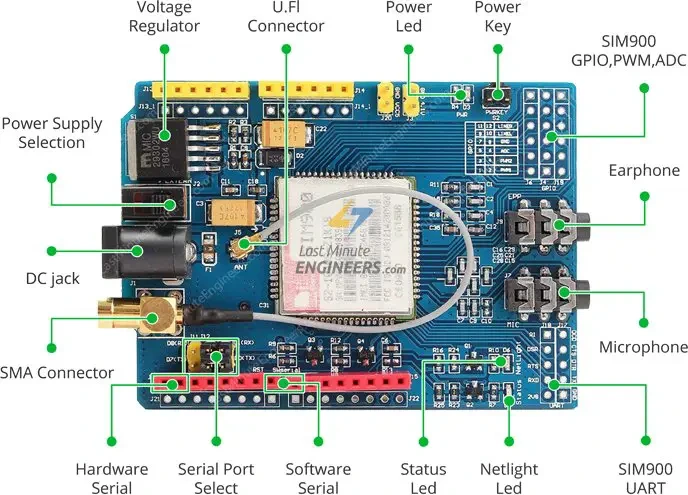
이 프로젝트에서는 아두이노로 SMS를 통해 센서 데이터를 요청하는 방법을 보여드리겠습니다. 예를 들어 DHT11 센서에서 온도와 습도를 요청하겠습니다. 아두이노로 SMS를 주고받기 위해 SIM900 GSM 쉴드를 사용하겠습니다.
// Include DHT library and Adafruit Sensor Library
#include "DHT.h"
#include <Adafruit_Sensor.h>
//Include Software Serial library to communicate with GSM
#include <SoftwareSerial.h>

// Arduino Pin  DHT is connected to
#define DHTPIN 2

// Uncomment whatever type of sensor you're using
//#define DHTTYPE DHT11   // DHT 11
#define DHTTYPE DHT22   // DHT 22  (AM2302)
//#define DHTTYPE DHT21   // DHT 21 (AM2301)

// Initialize DHT sensor for normal 16mhz Arduino
DHT dht(DHTPIN, DHTTYPE);

// Create global varibales to store temperature and humidity
float t; // temperature in celcius
float f; // temperature in fahrenheit
float h; // humidity

// Configure software serial port
SoftwareSerial SIM900(7, 8); // Arduino pin 7 -- SIM900 GSM GPRS TxD; pin 8 -- SIM900 GSM GPRS RXD

// Create variable to store incoming SMS characters
char incomingChar;

void setup() {
  dht.begin();

  Serial.begin(19200);
  SIM900.begin(19200);

  // Give time to your GSM shield log on to network
  delay(20000);
  Serial.print("SIM900 ready...");

  // AT command to set SIM900 to SMS mode
  SIM900.print("AT+CMGF=1\r");
  delay(100);
  // Set module to send SMS data to serial out upon receipt
  SIM900.print("AT+CNMI=2,2,0,0,0\r");
  delay(100);
}

void loop(){
  if (SMSRequest()){
    if(readData()){
      delay(10);
      // REPLACE THE X's WITH THE RECIPIENT'S MOBILE NUMBER
      // USE INTERNATIONAL FORMAT CODE FOR MOBILE NUMBERS
      SIM900.println("AT + CMGS = \"+XXXXXXXXXX\"");
      delay(100);
      // REPLACE WITH YOUR OWN SMS MESSAGE CONTENT
      String dataMessage = ("Temperature: " + String(t) + "*C " + " Humidity: " + String(h) + "%");
      // Uncomment to change message with farenheit temperature
      // String dataMessage = ("Temperature: " + String(f) + "*F " + " Humidity: " + String(h) + "%");

      // Send the SMS text message
      SIM900.print(dataMessage);
      delay(100);
      // End AT command with a ^Z, ASCII code 26
      SIM900.println((char)26);
      delay(100);
      SIM900.println();
      // Give module time to send SMS
      delay(5000);
    }
  }
  delay(10);
}

boolean readData() {
  //Read humidity
  h = dht.readHumidity();
  // Read temperature as Celsius
  t = dht.readTemperature();
  // Read temperature as Fahrenheit
  f = dht.readTemperature(true);

  // Compute temperature values in Celcius
  t = dht.computeHeatIndex(t,h,false);

  // Uncomment to compute temperature values in Fahrenheit
  //f = dht.computeHeatIndex(f,h,false);

  // Check if any reads failed and exit early (to try again).
  if (isnan(h) || isnan(t) || isnan(f)) {
    Serial.println("Failed to read from DHT sensor!");
    return false;
  }
  Serial.print("Humidity: ");
  Serial.print(h);
  Serial.print(" %\t");
  Serial.print("Temperature: ");
  Serial.print(t);
  Serial.print(" *C ");
  //Uncomment to print temperature in Farenheit
  //Serial.print(f);
  //Serial.print(" *F\t");
  return true;
}

boolean SMSRequest() {
  if(SIM900.available() >0) {
    incomingChar=SIM900.read();
    if(incomingChar=='S') {
      delay(10);
      Serial.print(incomingChar);
      incomingChar=SIM900.read();
      if(incomingChar =='T') {
        delay(10);
        Serial.print(incomingChar);
        incomingChar=SIM900.read();
        if(incomingChar=='A') {
          delay(10);
          Serial.print(incomingChar);
          incomingChar=SIM900.read();
          if(incomingChar=='T') {
            delay(10);
            Serial.print(incomingChar);
            incomingChar=SIM900.read();
            if(incomingChar=='E') {
              delay(10);
              Serial.print(incomingChar);
              Serial.print("...Request Received \n");
              return true;
            }
          }
        }
      }
    }
  }
  return false;
}
반응형
'아두이노우노 R4' 카테고리의 다른 글
| Arduino를 사용하여 ESP32 보드에 FreeRTOS 구현하기 2 (5) | 2025.06.30 |
|---|---|
| Arduino를 사용하여 ESP32 보드에 FreeRTOS 구현하기 1 (1) | 2025.06.30 |
| Arduino를 사용하여 ESP32 보드에 FreeRTOS 구현하기 4 (3) | 2025.06.30 |
| Arduino를 사용하여 ESP32 보드에 FreeRTOS 구현하기 3 (1) | 2025.06.30 |
| Lora 모듈: 15km 거리에서 릴레이 켜기 (0) | 2025.03.24 |
| Arduino 또는 ESP8266을 사용한 JSON 디코딩 및 인코딩 (9) | 2025.03.20 |
| 포모도로 기법과 아두이노로 실제 만드는 방법 (0) | 2025.03.06 |
| 막대에 LED 달아 회전하게 만들기 회로를 구성과 부품 (0) | 2025.03.05 |
취업, 창업의 막막함, 외주 관리, 제품 부재!
당신의 고민은 무엇입니까? 현실과 동떨어진 교육, 실패만 반복하는 외주 계약,
아이디어는 있지만 구현할 기술이 없는 막막함.
우리는 알고 있습니다. 문제의 원인은 '명확한 학습, 실전 경험과 신뢰할 수 있는 기술력의 부재'에서 시작됩니다.
이제 고민을 멈추고, 캐어랩을 만나세요!
코딩(펌웨어), 전자부품과 디지털 회로설계, PCB 설계 제작, 고객(시장/수출) 발굴과 마케팅 전략으로 당신을 지원합니다.
제품 설계의 고수는 성공이 만든 게 아니라 실패가 만듭니다. 아이디어를 양산 가능한 제품으로!
귀사의 제품을 만드세요. 교육과 개발 실적으로 신뢰할 수 있는 파트너를 확보하세요.
캐어랩


