Note: this post is also applicable to AGENTS.md, the open-source equivalent of CLAUDE.md for agents and harnesses like OpenCode, Zed, Cursor and Codex. - 문서 출처
Writing a good CLAUDE.md
`CLAUDE.md` is a high-leverage configuration point for Claude Code. Learning how to write a good `CLAUDE.md` (or `AGENTS.md`) is a key skill for agent-enabled software engineering.
www.humanlayer.dev
참고: 훌륭한 agents.md 작성법: 2,500개 이상의 저장소에서 얻은 교훈
## Principle: LLMs are (mostly) stateless
LLMs are stateless functions. Their weights are frozen by the time they're used for inference, so they don't learn over time. The only thing that the model knows about your codebase is the tokens you put into it.
Similarly, coding agent harnesses such as Claude Code usually require you to manage agents' memory explicitly. CLAUDE.md (or AGENTS.md) is the only file that by default goes into every single conversation you have with the agent.
This has three important implications:
- Coding agents know absolutely nothing about your codebase at the beginning of each session.
- The agent must be told anything that's important to know about your codebase each time you start a session.
- CLAUDE.md is the preferred way of doing this.
## CLAUDE.md onboards Claude to your codebase
Since Claude doesn't know anything about your codebase at the beginning of each session, you should use CLAUDE.md to onboard Claude into your codebase. At a high level, this means it should cover:
- WHAT: tell Claude about the tech, your stack, the project structure. Give Claude a map of the codebase. This is especially important in monorepos! Tell Claude what the apps are, what the shared packages are, and what everything is for so that it knows where to look for things
- WHY: tell Claude the purpose of the project and what everything is doing in the repository. What are the purpose and function of the different parts of the project?
- HOW: tell Claude how it should work on the project. For example, do you use bun instead of node? You want to include all the information it needs to actually do meaningful work on the project. How can Claude verify Claude's changes? How can it run tests, typechecks, and compilation steps?
But the way you do this is important! Don't try to stuff every command Claude could possibly need to run in your CLAUDE.md file - you will get sub-optimal results.
## Claude often ignores CLAUDE.md
Regardless of which model you're using, you may notice that Claude frequently ignores your CLAUDE.md file's contents.
You can investigate this yourself by putting a logging proxy between the claude code CLI and the Anthropic API using ANTHROPIC_BASE_URL. Claude code injects the following system reminder with your CLAUDE.md file in the user message to the agent:
<system-reminder>
      IMPORTANT: this context may or may not be relevant to your tasks.
      You should not respond to this context unless it is highly relevant to your task.
</system-reminder>
As a result, Claude will ignore the contents of your CLAUDE.md if it decides that it is not relevant to its current task. The more information you have in the file that's not universally applicable to the tasks you have it working on, the more likely it is that Claude will ignore your instructions in the file.
Why did Anthropic add this? It's hard to say for sure, but we can speculate a bit. Most CLAUDE.md files we come across include a bunch of instructions in the file that aren't broadly applicable. Many users treat the file as a way to add "hotfixes" to behavior they didn't like by appending lots of instructions that weren't necessarily broadly applicable.
We can only assume that the Claude Code team found that by telling Claude to ignore the bad instructions, the harness actually produced better results.
## Creating a good CLAUDE.md file
The following section provides a number of recommendations on how to write a good CLAUDE.md file following context engineering best practices.
Your mileage may vary. Not all of these rules are necessarily optimal for every setup. Like anything else, feel free to break the rules once...
- you understand when & why it's okay to break them
- you have a good reason to do so
### Less (instructions) is more
It can be tempting to try and stuff every single command that claude could possibly need to run, as well as your code standards and style guidelines into CLAUDE.md. We recommend against this.
Though the topic hasn't been investigated in an incredibly rigorous manner, some research has been done which indicates the following:
- Frontier thinking LLMs can follow ~ 150-200 instructions with reasonable consistency. Smaller models can attend to fewer instructions than larger models, and non-thinking models can attend to fewer instructions than thinking models.
- Smaller models get MUCH worse, MUCH more quickly. Specifically, smaller models tend to exhibit an expotential decay in instruction-following performance as the number of instructions increase, whereas larger frontier thinking models exhibit a linear decay (see below). For this reason, we recommend against using smaller models for multi-step tasks or complicated implementation plans.
- LLMs bias towards instructions that are on the peripheries of the prompt: at the very beginning (the Claude Code system message and CLAUDE.md), and at the very end (the most-recent user messages)
- As instruction count increases, instruction-following quality decreases uniformly. This means that as you give the LLM more instructions, it doesn't simply ignore the newer ("further down in the file") instructions - it begins to ignore all of them uniformly
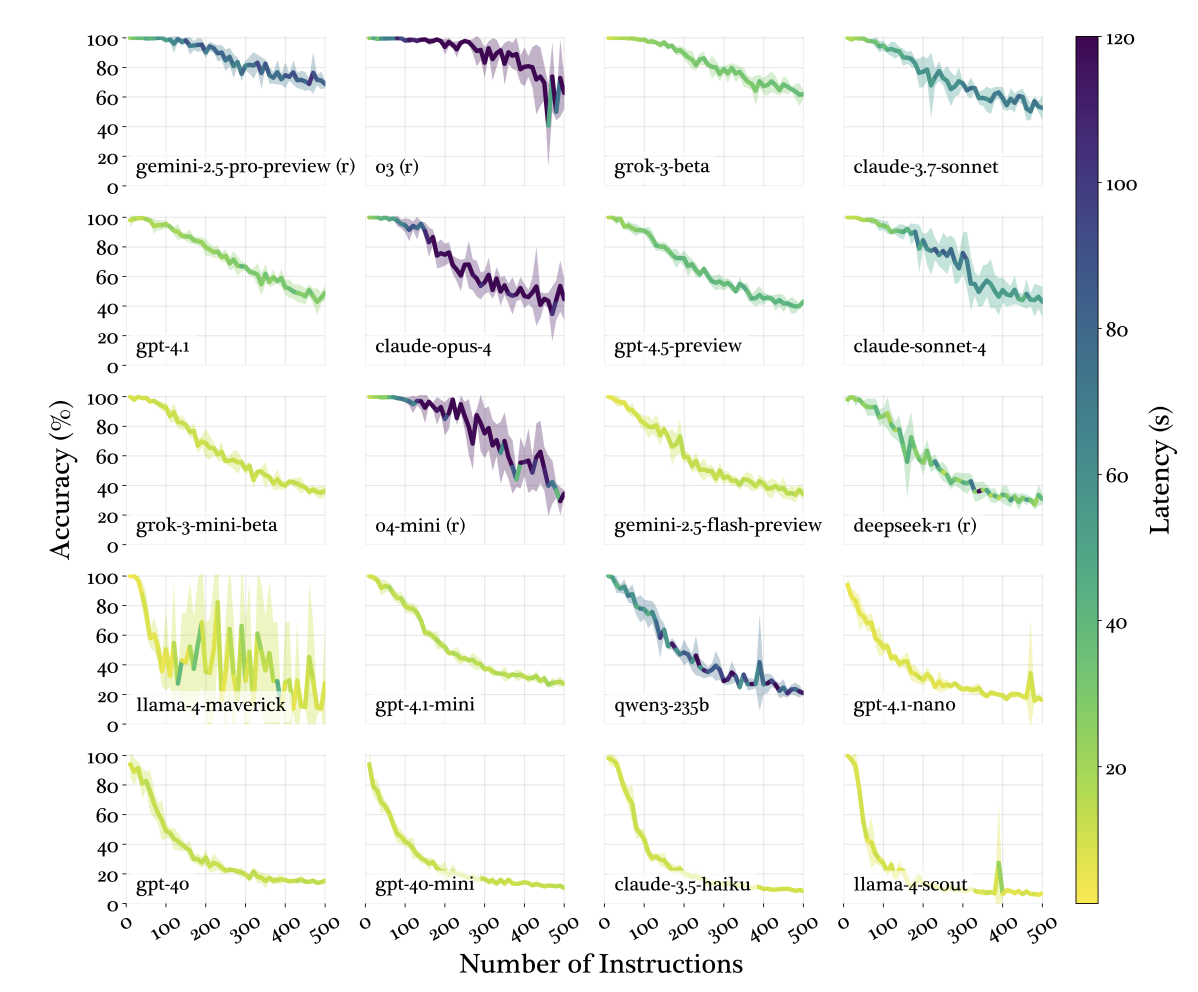
Our analysis of the Claude Code harness indicates that Claude Code's system prompt contains ~50 individual instructions. Depending on the model you're using, that's nearly a third of the instructions your agent can reliably follow already - and that's before rules, plugins, skills, or user messages.
This implies that your CLAUDE.md file should contain as few instructions as possible - ideally only ones which are universally applicable to your task.
### CLAUDE.md file length & applicability
All else being equal, an LLM will perform better on a task when its' context window is full of focused, relevant context including examples, related files, tool calls, and tool results compared to when its context window has a lot of irrelevant context.
Since CLAUDE.md goes into every single session, you should ensure that its contents are as universally applicable as possible.
For example, avoid including instructions about (for example) how to structure a new database schema - this won't matter and will distract the model when you're working on something else that's unrelated!
Length-wise, the less is more principle applies as well. While Anthropic does not have an official recommendation on how long your CLAUDE.md file should be, general consensus is that < 300 lines is best, and shorter is even better.
At HumanLayer, our root CLAUDE.md file is less than sixty lines.
### Progressive Disclosure
Writing a concise CLAUDE.md file that covers everything you want Claude to know can be challenging, especially in larger projects.
To address this, we can leverage the principle of Progressive Disclosure to ensure that claude only sees task- or project-specific instructions when it needs them.
Instead of including all your different instructions about building your project, running tests, code conventions, or other important context in your CLAUDE.md file, we recommend keeping task-specific instructions in separate markdown files with self-descriptive names somewhere in your project.
For example:
agent_docs/
  |- building_the_project.md
  |- running_tests.md
  |- code_conventions.md
  |- service_architecture.md
  |- database_schema.md
  |- service_communication_patterns.md
Then, in your CLAUDE.md file, you can include a list of these files with a brief description of each, and instruct Claude to decide which (if any) are relevant and to read them before it starts working. Or, ask Claude to present you with the files it wants to read for aproval first before reading them.
Prefer pointers to copies. Don't include code snippets in these files if possible - they will become out-of-date quickly. Instead, include file:line references to point Claude to the authoritative context.
Conceptually, this is very similar to how Claude Skills are intended to work, although skills are more focused on tool use than instructions.
### Claude is (not) an expensive linter
One of the most common things that we see people put in their CLAUDE.md file is code style guidelines. Never send an LLM to do a linter's job. LLMs are comparably expensive and incredibly slow compared to traditional linters and formatters. We think you should always use deterministic tools whenever you can.
Code style guidelines will inevitably add a bunch of instructions and mostly-irrelevant code snippets into your context window, degrading your LLM's performance and instruction-following and eating up your context window.
LLMs are in-context learners! If your code follows a certain set of style guidelines or patterns, you should find that armed with a few searches of your codebase (or a good research document!) your agent should tend to follow existing code patterns and conventions without being told to.
If you feel very stronly about this, you might even consider setting up a Claude Code Stop hook that runs your formatter & linter and presents errors to Claude for it to fix. Don't make Claude find the formatting issues itself.
Bonus points: use a linter that can automatically fix issues (we like Biome), and carefully tune your rules about what can safely be auto-fixed for maximum (safe) coverage.
You could also create a Slash Command that includes your code guidelines and which points claude at the changes in version control, or at your git status, or similar. This way, you can handle implementation and formatting separately. You will see better results with both as a result.
### Don't use /init or auto-generate your CLAUDE.md
Both Claude Code and other harnesses with OpenCode come with ways to auto-generate your CLAUDE.md file (or AGENTS.md).
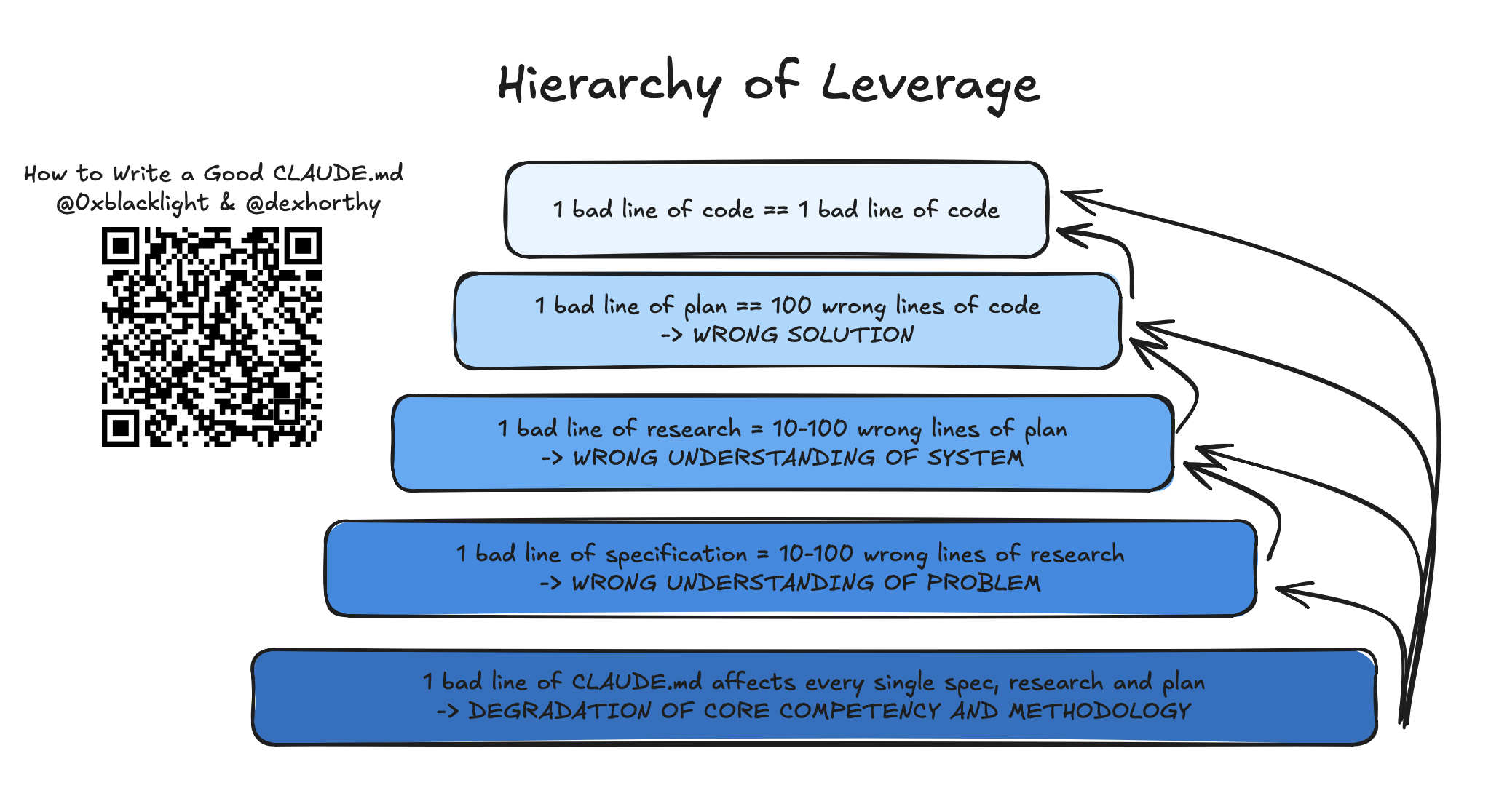
Because CLAUDE.md goes into every single session with Claude code, it is one of the highest leverage points of the harness - for better or for worse, depending on how you use it.
A bad line of code is a bad line of code. A bad line of an implementation plan has the potential to create a lot of bad lines of code. A bad line of a research that misunderstands how the system works has the potential to result in a lot of bad lines in the plan, and therefore a lot more bad lines of code as a result.
But the CLAUDE.md file affects every single phase of your workflow and every single artifact produced by it. As a result, we think you should spend some time thinking very carefully about every single line that goes into it:
## In Conclusion
- CLAUDE.md is for onboarding Claude into your codebase. It should define your project's WHY, WHAT, and HOW.
- Less (instructions) is more. While you shouldn't omit necessary instructions, you should include as few instructions as reasonably possible in the file.
- Keep the contents of your CLAUDE.md concise and universally applicable.
- Use Progressive Disclosure - don't tell Claude all the information you could possibly want it to know. Rather, tell it how to find important information so that it can find and use it, but only when it needs to to avoid bloating your context window or instruction count.
- Claude is not a linter. Use linters and code formatters, and use other features like Hooks and Slash Commands as necessary.
- CLAUDE.md is the highest leverage point of the harness, so avoid auto-generating it. You should carefully craft its contents for best results.
'개발자 > 인공지능과 인간' 카테고리의 다른 글
| 5년 후, 당신의 커리어는 존재하지 않을 수도 있다 (0) | 2026.05.11 |
|---|---|
| OpenAI Free AI Academy 교육 플랫폼 공개 (0) | 2026.03.13 |
| AI 시스템이 또 다른 AI 시스템을 구축하는 문제 (0) | 2026.02.02 |
| AI가 의식을 가질 수 있는 가능성 (1) | 2026.01.05 |
| 인간이 기계와 논쟁해도 항상 기계가 이기는 시점 (0) | 2025.11.09 |
| 생성형 AI 5종 조합해서 사용하는 실력을 키우세요 (0) | 2025.10.27 |
| OpenAI DevDay 2025 — 샘 올트먼 기조연설 요약 (0) | 2025.10.07 |
| AI 동반자의 정서적 위험은 주의를 요구합니다 (5) | 2025.08.26 |
취업, 창업의 막막함, 외주 관리, 제품 부재!
당신의 고민은 무엇입니까? 현실과 동떨어진 교육, 실패만 반복하는 외주 계약,
아이디어는 있지만 구현할 기술이 없는 막막함.
우리는 알고 있습니다. 문제의 원인은 '명확한 학습, 실전 경험과 신뢰할 수 있는 기술력의 부재'에서 시작됩니다.
이제 고민을 멈추고, 캐어랩을 만나세요!
코딩(펌웨어), 전자부품과 디지털 회로설계, PCB 설계 제작, 고객(시장/수출) 발굴과 마케팅 전략으로 당신을 지원합니다.
제품 설계의 고수는 성공이 만든 게 아니라 실패가 만듭니다. 아이디어를 양산 가능한 제품으로!
귀사의 제품을 만드세요. 교육과 개발 실적으로 신뢰할 수 있는 파트너를 확보하세요.
캐어랩


