아두이노용 DFPlayer 미니 MP3 플레이어는 스피커로 직접 출력하는 간소화된 소형 저비용 MP3 모듈입니다. 이 모듈은 배터리, 스피커 및 푸시 버튼이 부착된 독립형 모듈로 사용하거나 Arduino, ESP32, 라즈베리 파이 및 Uart가 있는 마이크로 컨트롤러와 같은 마이크로 컨트롤러와 함께 사용할 수 있습니다. 자료 링크
사양
- 샘플링 속도(kHz): 8/11.025/12/16/22.05/24/32/44.1/48
- 24비트 DAC 출력, 동적 범위 90dB 지원, SNR 지원 85dB
- FAT16, FAT32 파일 시스템 완벽 지원, 최대 지원 32G의 TF 카드, 32G의 U 디스크 지원, 64M 바이트 NORFLASH
- 다양한 제어 모드, I/O 제어 모드, 직렬 모드, AD 버튼 제어 모드
- 광고 사운드 대기 기능, 음악을 일시 중지할 수 있습니다. 음악에서 광고가 끝나면 폴더별로 정렬 된 오디오 데이터를 계속 재생하고 최대 100 개의 폴더를 지원하며 각 폴더는 최대 255 곡을 저장할 수 있습니다.
- 30 레벨 조절 가능한 볼륨, 6 레벨 EQ 조절 가능

애플리케이션
내비게이션 음성 방송, 도로 교통 검사관, 요금소 음성 안내, 기차역, 버스 안전 점검 음성 안내, 전기, 통신, 금융 비즈니스 홀 음성 안내, 채널 출입 차량 확인 음성 안내, 공공 보안 국경 통제 채널 음성 안내, 다중 채널 음성 경보 또는 장비 작동 안내 음성, 전기 관광차 안전 운전 음성 안내, 전자 기계 장비 고장 경보, 화재 경보 음성 안내, 자동 방송 장비, 정기 방송.
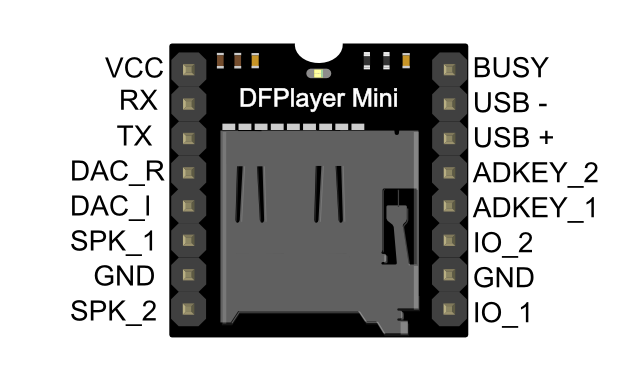
핀 맵

작업 모드
1. Serial 모드
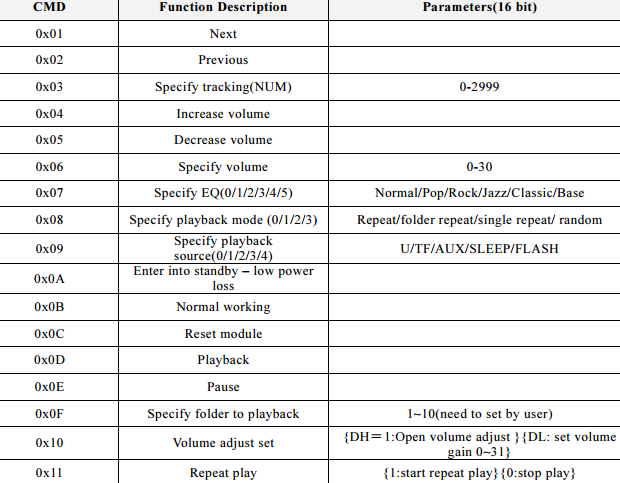
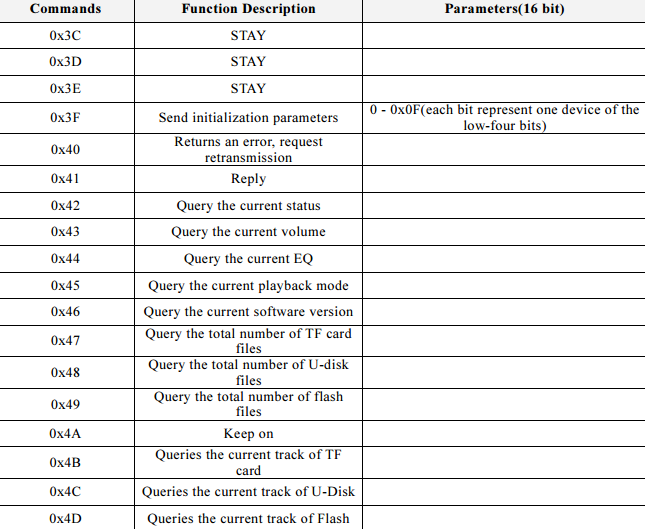
PC 직렬 전송 명령을 통한 비동기 직렬 통신 모드 지원 통신 표준:9600bps 데이터 비트:1 체크 아웃:없음 흐름 제어:없음
명령어 설명

Serial Control Cmd
Serial Query Cmd
2. AD 키 모드
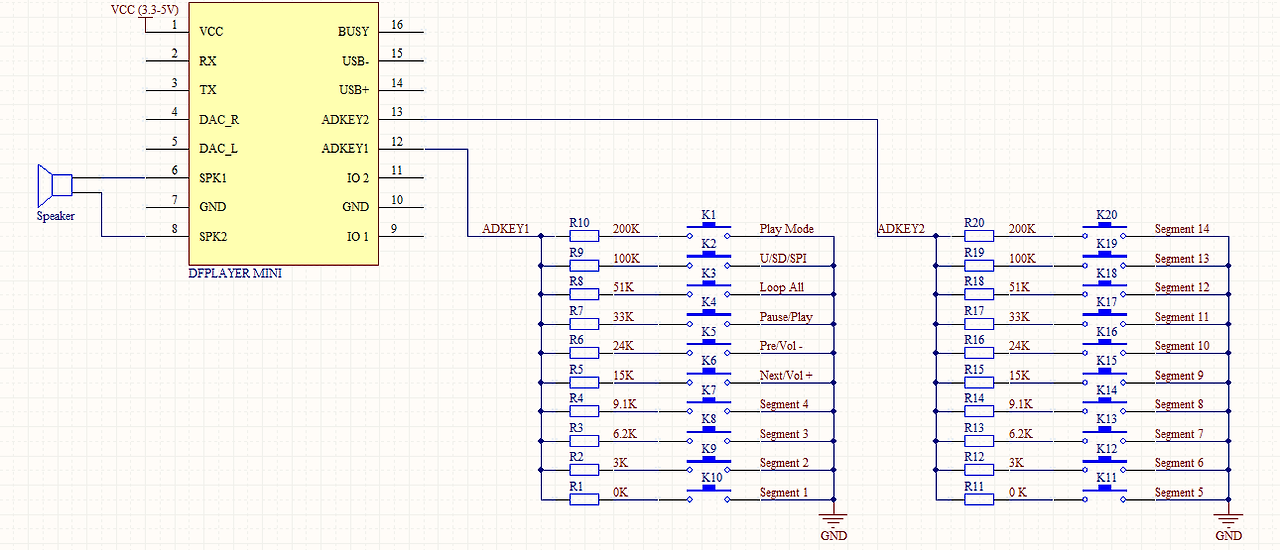
우리는 매트릭스 키보드 연결의 전통적인 방법 대신 AD 모듈 키를 사용하여 점점 더 강력한 MCU AD 기능을 활용하는 것입니다, 우리의 모듈 기본 구성 2 AD 포트, 20 키 저항 분배.
DFRobot 스토어 또는 DFRobot 대리점에서 AD 버튼을 받으십시오.
다이어그램을 참조하십시오.
3. I/O 모드
이 모듈을 사용하는 가장 간단한 방법은 다음과 같습니다. 다이어그램을 참조하세요.
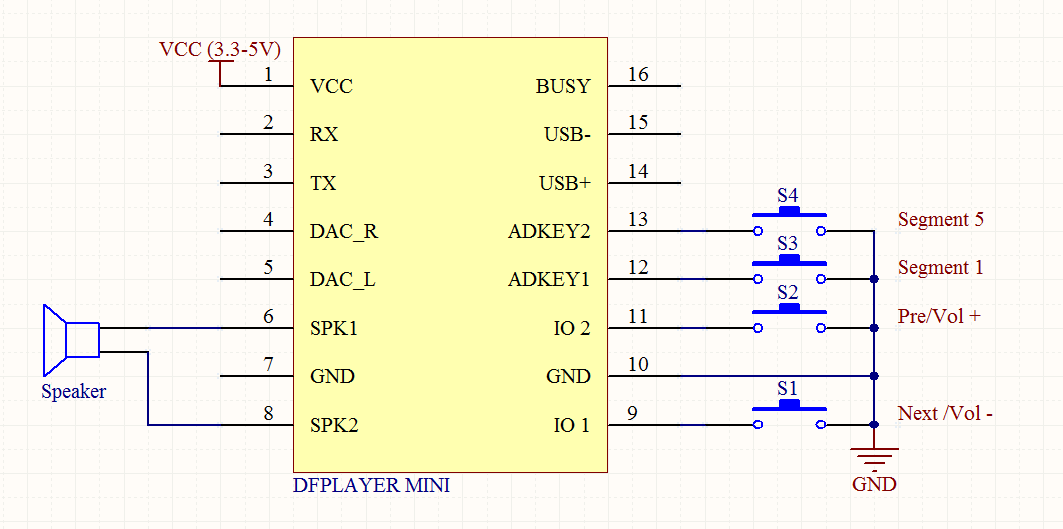
참고: 짧게 누르면 이전/다음, 길게 누르면 볼륨-, 볼륨 +
연결 다이어그램
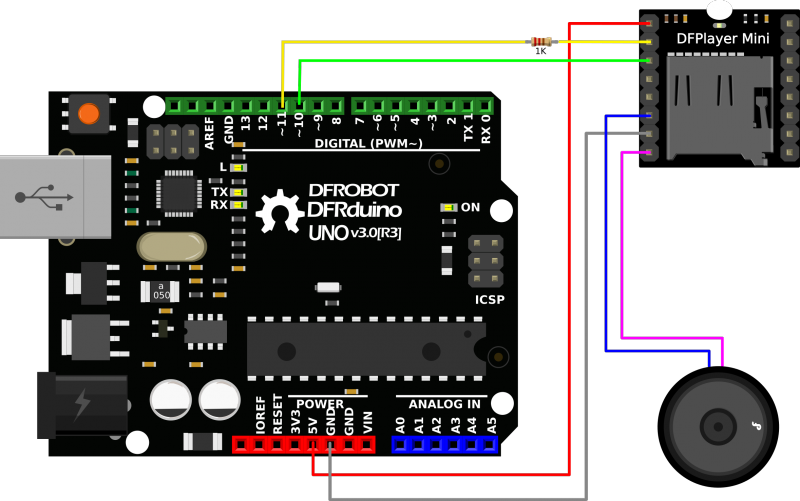
참고: DFPlayer mini의 작동 전압은 3.3V이며, 대부분의 Arduino의 작동 전압은 5V입니다. 테스트 결과, 아두이노를 DFPlayer mini에 직접 연결하면 정상적으로 음악을 재생할 수 있지만 비정상적인 노이즈가 발생할 수 있습니다. 전압 분배기를 위해 1k 저항을 DFPlayer의 RX 핀에 직렬로 연결할 것을 권장합니다.
mp3를 마이크로 SD 카드에 복사하기
참고: mp3를 마이크로 SD 카드에 복사하는 순서는 mp3 재생 순서에 영향을 주므로 재생(1) 기능은 마이크로 SD 카드에 처음 복사한 mp3를 재생합니다.
Mac 사용자 참고: Mac OS X를 사용하여 mp3를 복사하는 경우 파일 시스템에 자동으로 숨겨진 파일이 추가됩니다: 인덱스에 "._0001.mp3"와 같은 숨겨진 파일이 추가되며, 이 모듈은 이를 유효한 mp3 파일로 처리합니다. 정말 성가신 일입니다. 따라서 터미널에서 다음 명령을 실행하여 해당 파일을 제거할 수 있습니다. dot_clean /Volumes/을 SD 카드의 볼륨 이름으로 바꿔주세요.
샘플 코드
DFPlayer Mini용 아두이노 라이브러리를 만들어서 간단하게 작동할 수 있도록 만들었습니다. 위 그림과 같이 하드웨어를 연결하고 샘플 코드를 사용하여 플레이하세요.
최신 라이브러리는 여기에서 다운로드할 수 있습니다: 3초마다 다음 곡으로 전환하는 샘플 코드 "GetStarted".
/***************************************************
DFPlayer - A Mini MP3 Player For Arduino
 <https://www.dfrobot.com/product-1121.html>

 ***************************************************
 This example shows the basic function of library for DFPlayer.

 Created 2016-12-07
 By [Angelo qiao](Angelo.qiao@dfrobot.com)

 GNU Lesser General Public License.
 See <http://www.gnu.org/licenses/> for details.
 All above must be included in any redistribution
 ****************************************************/

/***********Notice and Trouble shooting***************
 1.Connection and Diagram can be found here
 <https://www.dfrobot.com/wiki/index.php/DFPlayer_Mini_SKU:DFR0299#Connection_Diagram>
 2.This code is tested on Arduino Uno, Leonardo, Mega boards.
 ****************************************************/

#include "Arduino.h"
#include "DFRobotDFPlayerMini.h"

#if (defined(ARDUINO_AVR_UNO) || defined(ESP8266))   // Using a soft serial port
#include <SoftwareSerial.h>
SoftwareSerial softSerial(/*rx =*/10, /*tx =*/11);
#define FPSerial softSerial
#else
#define FPSerial Serial1
#endif

DFRobotDFPlayerMini myDFPlayer;
void printDetail(uint8_t type, int value);

void setup()
{
#if (defined ESP32)
  FPSerial.begin(9600, SERIAL_8N1, /*rx =*/D3, /*tx =*/D2);
#else
  FPSerial.begin(9600);
#endif

  Serial.begin(115200);

  Serial.println();
  Serial.println(F("DFRobot DFPlayer Mini Demo"));
  Serial.println(F("Initializing DFPlayer ... (May take 3~5 seconds)"));

  if (!myDFPlayer.begin(FPSerial, /*isACK = */true, /*doReset = */true)) {  //Use serial to communicate with mp3.
    Serial.println(F("Unable to begin:"));
    Serial.println(F("1.Please recheck the connection!"));
    Serial.println(F("2.Please insert the SD card!"));
    while(true){
      delay(0); // Code to compatible with ESP8266 watch dog.
    }
  }
  Serial.println(F("DFPlayer Mini online."));

  myDFPlayer.volume(10);  //Set volume value. From 0 to 30
  myDFPlayer.play(1);  //Play the first mp3
}

void loop()
{
  static unsigned long timer = millis();

  if (millis() - timer > 3000) {
    timer = millis();
    myDFPlayer.next();  //Play next mp3 every 3 second.
  }

  if (myDFPlayer.available()) {
    printDetail(myDFPlayer.readType(), myDFPlayer.read()); //Print the detail message from DFPlayer to handle different errors and states.
  }
}

void printDetail(uint8_t type, int value){
  switch (type) {
    case TimeOut:
      Serial.println(F("Time Out!"));
      break;
    case WrongStack:
      Serial.println(F("Stack Wrong!"));
      break;
    case DFPlayerCardInserted:
      Serial.println(F("Card Inserted!"));
      break;
    case DFPlayerCardRemoved:
      Serial.println(F("Card Removed!"));
      break;
    case DFPlayerCardOnline:
      Serial.println(F("Card Online!"));
      break;
    case DFPlayerUSBInserted:
      Serial.println("USB Inserted!");
      break;
    case DFPlayerUSBRemoved:
      Serial.println("USB Removed!");
      break;
    case DFPlayerPlayFinished:
      Serial.print(F("Number:"));
      Serial.print(value);
      Serial.println(F(" Play Finished!"));
      break;
    case DFPlayerError:
      Serial.print(F("DFPlayerError:"));
      switch (value) {
        case Busy:
          Serial.println(F("Card not found"));
          break;
        case Sleeping:
          Serial.println(F("Sleeping"));
          break;
        case SerialWrongStack:
          Serial.println(F("Get Wrong Stack"));
          break;
        case CheckSumNotMatch:
          Serial.println(F("Check Sum Not Match"));
          break;
        case FileIndexOut:
          Serial.println(F("File Index Out of Bound"));
          break;
        case FileMismatch:
          Serial.println(F("Cannot Find File"));
          break;
        case Advertise:
          Serial.println(F("In Advertise"));
          break;
        default:
          break;
      }
      break;
    default:
      break;
  }

}
모든 함수를 포함한 샘플 코드 "FullFunction". 댓글과 문서를 자세히 읽어보세요.
/***************************************************
 DFPlayer - A Mini MP3 Player For Arduino
 <https://www.dfrobot.com/product-1121.html>

 ***************************************************
 This example shows the all the function of library for DFPlayer.

 Created 2016-12-07
 By [Angelo qiao](Angelo.qiao@dfrobot.com)

 GNU Lesser General Public License.
 See <http://www.gnu.org/licenses/> for details.
 All above must be included in any redistribution
 ****************************************************/

/***********Notice and Trouble shooting***************
 1.Connection and Diagram can be found here
<https://www.dfrobot.com/wiki/index.php/DFPlayer_Mini_SKU:DFR0299#Connection_Diagram>
 2.This code is tested on Arduino Uno, Leonardo, Mega boards.
 ****************************************************/

#include "Arduino.h"
#include "DFRobotDFPlayerMini.h"

#if (defined(ARDUINO_AVR_UNO) || defined(ESP8266))   // Using a soft serial port
#include <SoftwareSerial.h>
SoftwareSerial softSerial(/*rx =*/10, /*tx =*/11);
#define FPSerial softSerial
#else
#define FPSerial Serial1
#endif

DFRobotDFPlayerMini myDFPlayer;
void printDetail(uint8_t type, int value);

void setup()
{
#if (defined ESP32)
  FPSerial.begin(9600, SERIAL_8N1, /*rx =*/D3, /*tx =*/D2);
#else
  FPSerial.begin(9600);
#endif

  Serial.begin(115200);

  Serial.println();
  Serial.println(F("DFRobot DFPlayer Mini Demo"));
  Serial.println(F("Initializing DFPlayer ... (May take 3~5 seconds)"));

  if (!myDFPlayer.begin(FPSerial, /*isACK = */true, /*doReset = */true)) {  //Use serial to communicate with mp3.
    Serial.println(F("Unable to begin:"));
    Serial.println(F("1.Please recheck the connection!"));
    Serial.println(F("2.Please insert the SD card!"));
    while(true);
  }
  Serial.println(F("DFPlayer Mini online."));

  myDFPlayer.setTimeOut(500); //Set serial communictaion time out 500ms

  //----Set volume----
  myDFPlayer.volume(10);  //Set volume value (0~30).
  myDFPlayer.volumeUp(); //Volume Up
  myDFPlayer.volumeDown(); //Volume Down

  //----Set different EQ----
  myDFPlayer.EQ(DFPLAYER_EQ_NORMAL);
//  myDFPlayer.EQ(DFPLAYER_EQ_POP);
//  myDFPlayer.EQ(DFPLAYER_EQ_ROCK);
//  myDFPlayer.EQ(DFPLAYER_EQ_JAZZ);
//  myDFPlayer.EQ(DFPLAYER_EQ_CLASSIC);
//  myDFPlayer.EQ(DFPLAYER_EQ_BASS);

  //----Set device we use SD as default----
//  myDFPlayer.outputDevice(DFPLAYER_DEVICE_U_DISK);
  myDFPlayer.outputDevice(DFPLAYER_DEVICE_SD);
//  myDFPlayer.outputDevice(DFPLAYER_DEVICE_AUX);
//  myDFPlayer.outputDevice(DFPLAYER_DEVICE_SLEEP);
//  myDFPlayer.outputDevice(DFPLAYER_DEVICE_FLASH);

  //----Mp3 control----
//  myDFPlayer.sleep();     //sleep
//  myDFPlayer.reset();     //Reset the module
//  myDFPlayer.enableDAC();  //Enable On-chip DAC
//  myDFPlayer.disableDAC();  //Disable On-chip DAC
//  myDFPlayer.outputSetting(true, 15); //output setting, enable the output and set the gain to 15

  //----Mp3 play----
  myDFPlayer.next();  //Play next mp3
  delay(1000);
  myDFPlayer.previous();  //Play previous mp3
  delay(1000);
  myDFPlayer.play(1);  //Play the first mp3
  delay(1000);
  myDFPlayer.loop(1);  //Loop the first mp3
  delay(1000);
  myDFPlayer.pause();  //pause the mp3
  delay(1000);
  myDFPlayer.start();  //start the mp3 from the pause
  delay(1000);
  myDFPlayer.playFolder(15, 4);  //play specific mp3 in SD:/15/004.mp3; Folder Name(1~99); File Name(1~255)
  delay(1000);
  myDFPlayer.enableLoopAll(); //loop all mp3 files.
  delay(1000);
  myDFPlayer.disableLoopAll(); //stop loop all mp3 files.
  delay(1000);
  myDFPlayer.playMp3Folder(4); //play specific mp3 in SD:/MP3/0004.mp3; File Name(0~65535)
  delay(1000);
  myDFPlayer.advertise(3); //advertise specific mp3 in SD:/ADVERT/0003.mp3; File Name(0~65535)
  delay(1000);
  myDFPlayer.stopAdvertise(); //stop advertise
  delay(1000);
  myDFPlayer.playLargeFolder(2, 999); //play specific mp3 in SD:/02/004.mp3; Folder Name(1~10); File Name(1~1000)
  delay(1000);
  myDFPlayer.loopFolder(5); //loop all mp3 files in folder SD:/05.
  delay(1000);
  myDFPlayer.randomAll(); //Random play all the mp3.
  delay(1000);
  myDFPlayer.enableLoop(); //enable loop.
  delay(1000);
  myDFPlayer.disableLoop(); //disable loop.
  delay(1000);

  //----Read imformation----
  Serial.println(myDFPlayer.readState()); //read mp3 state
  Serial.println(myDFPlayer.readVolume()); //read current volume
  Serial.println(myDFPlayer.readEQ()); //read EQ setting
  Serial.println(myDFPlayer.readFileCounts()); //read all file counts in SD card
  Serial.println(myDFPlayer.readCurrentFileNumber()); //read current play file number
  Serial.println(myDFPlayer.readFileCountsInFolder(3)); //read file counts in folder SD:/03
}

void loop()
{
  static unsigned long timer = millis();

  if (millis() - timer > 3000) {
    timer = millis();
    myDFPlayer.next();  //Play next mp3 every 3 second.
  }

  if (myDFPlayer.available()) {
    printDetail(myDFPlayer.readType(), myDFPlayer.read()); //Print the detail message from DFPlayer to handle different errors and states.
  }
}

void printDetail(uint8_t type, int value){
  switch (type) {
    case TimeOut:
      Serial.println(F("Time Out!"));
      break;
    case WrongStack:
      Serial.println(F("Stack Wrong!"));
      break;
    case DFPlayerCardInserted:
      Serial.println(F("Card Inserted!"));
      break;
    case DFPlayerCardRemoved:
      Serial.println(F("Card Removed!"));
      break;
    case DFPlayerCardOnline:
      Serial.println(F("Card Online!"));
      break;
    case DFPlayerUSBInserted:
      Serial.println("USB Inserted!");
      break;
    case DFPlayerUSBRemoved:
      Serial.println("USB Removed!");
      break;
    case DFPlayerPlayFinished:
      Serial.print(F("Number:"));
      Serial.print(value);
      Serial.println(F(" Play Finished!"));
      break;
    case DFPlayerError:
      Serial.print(F("DFPlayerError:"));
      switch (value) {
        case Busy:
          Serial.println(F("Card not found"));
          break;
        case Sleeping:
          Serial.println(F("Sleeping"));
          break;
        case SerialWrongStack:
          Serial.println(F("Get Wrong Stack"));
          break;
        case CheckSumNotMatch:
          Serial.println(F("Check Sum Not Match"));
          break;
        case FileIndexOut:
          Serial.println(F("File Index Out of Bound"));
          break;
        case FileMismatch:
          Serial.println(F("Cannot Find File"));
          break;
        case Advertise:
          Serial.println(F("In Advertise"));
          break;
        default:
          break;
      }
      break;
    default:
      break;
  }

}
참고: 폴더 이름은 mp3여야 하며 SD 카드 루트 디렉터리 아래에 위치해야 하고, mp3 파일 이름은 4자리 숫자(예: "0001.mp3")로 mp3 폴더 아래에 위치해야 합니다. 영어와 중국어로 이름을 지정하려면 "0001hello.mp3" 또는 "0001后来.mp3"와 같이 숫자 뒤에 추가하면 됩니다.
'개발자 > 부품' 카테고리의 다른 글
| LED Night Lider 회로 (2) | 2024.09.27 |
|---|---|
| 멀티 콘센트 USB-C PD 공급 장치 (0) | 2024.09.25 |
| 펠티어소자 냉각장치 제작 키트 소형냉장고 미니에어컨 (2) | 2024.09.19 |
| Diode Zener 1 Watt (1) | 2024.09.18 |
| 아두이노 DS18B20 방수형 온도 측정센서 (프로브타입) (0) | 2024.09.14 |
| Capacitive Touch Sensor(정전 용량 터치 센서) (3) | 2024.09.13 |
| 터치용 정전식 센싱 Capacitive sensing for touch (0) | 2024.09.12 |
| TEC1-12706 열전 냉각기 펠티에 모듈 (3) | 2024.09.10 |
취업, 창업의 막막함, 외주 관리, 제품 부재!
당신의 고민은 무엇입니까? 현실과 동떨어진 교육, 실패만 반복하는 외주 계약,
아이디어는 있지만 구현할 기술이 없는 막막함.
우리는 알고 있습니다. 문제의 원인은 '명확한 학습, 실전 경험과 신뢰할 수 있는 기술력의 부재'에서 시작됩니다.
이제 고민을 멈추고, 캐어랩을 만나세요!
코딩(펌웨어), 전자부품과 디지털 회로설계, PCB 설계 제작, 고객(시장/수출) 발굴과 마케팅 전략으로 당신을 지원합니다.
제품 설계의 고수는 성공이 만든 게 아니라 실패가 만듭니다. 아이디어를 양산 가능한 제품으로!
귀사의 제품을 만드세요. 교육과 개발 실적으로 신뢰할 수 있는 파트너를 확보하세요.
캐어랩


