이전 포스팅에서 Arduino UNO R4WiFi에 기압 센서 LPS22HB를 연결하여 BLE 주변 장치를 만들었습니다.
PC에서 움직이는 온세미컨덕터의 BLE인 RSL10 Bluetooth Low Enaergy Exploer에서 connect 하여 기압과 온도 데이터를 받았습니다.
본 문서의 전체 리스트를 링크로 연결하였습니다. 참고하세요.
UNO R4 WiFi BLE ⑥ BME280의 BLE 주변기기와 연결되는 센트럴
UNO R4 WiFi BLE ⑤ BME280의 BLE peripheral
UNO R4 WiFi BLE ④ 기압 센서 BME280을 연결
UNO R4 WiFi BLE ③ LPS22의 BLE 주변기기와 연결되는 센트럴
UNO R4 WiFi BLE ② LPS22의 BLE 주변기기
UNO R4 WiFi BLE ① 기압 센서 LPS22 연결
이 마이크로 컴퓨터 보드 Arduino UNO R4 WiFi를 PC의 USB에서 분리하고 전원을 연결하여 단독으로 작동시킵니다. 그리고 RSL10 Bluetooth Low Enaergy Exploer로 연결할 수 있는지 확인했습니다.
● 두 번째 마이크로 컨트롤러 보드 Arduino UNO R4 WiFi를 준비 또 하나의 마이크로 컴퓨터 보드 Arduino UNO R4 WiFi를 준비하여 PC에 연결하여 BLE 센트럴 스케치를 만듭니다.
● BLE의 각종 정의 BLE 주변 장치는 localNAME에서 선택합니다.
#define localNAME "LPS22_float"
접속할 수 있으면, 캐릭터리스틱을 지정해 읽어냅니다.
#define LPS22_Temp_Characteristic_UUID    "F000AA31-0451-4000-B000-000000000000"  // BLE  Characteristic
#define LPS22_Press_Characteristic_UUID   "F000AA32-0451-4000-B000-000000000000"
●setup-BLE
먼저 초기화합니다.
BLE.begin();
localNAME에서 찾습니다.
// start scanning for peripherals
BLE.scanForName(localNAME);
● loop-BLE 주변이 발견되면 주소, localNAME, 서비스 UUID를 인쇄합니다.
  // check if a peripheral has been discovered
  BLEDevice peripheral = BLE.available();

  if (peripheral) {
    // discovered a peripheral, print out address, local name, and advertised service
    Serial.print("Found ");
    Serial.print(peripheral.address());
    Serial.print(" '");
    Serial.print(peripheral.localName());
    Serial.print("' ");
    Serial.print(peripheral.advertisedServiceUuid());
    Serial.println();
스캔을 중지합니다.
// stop scanning
BLE.stopScan();
읽기 기능을 실행합니다.
readData(peripheral);
읽기 함수에서는 먼저 connect를 사용합니다.
if (peripheral.connect ()) {
다음은 디스커버입니다.
if(peripheral.discoverAttributes ()) {
온도와 기압의 UUID로 데이터를 취득합니다.
 // retrieve the characteristic
  BLECharacteristic Temperature_Characteristic = peripheral.characteristic(LPS22_Temp_Characteristic_UUID);
  BLECharacteristic Pressure_Characteristic  = peripheral.characteristic(LPS22_Press_Characteristic_UUID);
온도 데이터를 읽고 IEEE-754 형식(단정밀도 부동 소수점 숫자)을 실수로 변환하여 인쇄합니다.
참고: IEEE754 단정밀도 부동소수점수 형식 : binary32 변환
 Temperature_Characteristic.read();
    if (Temperature_Characteristic.valueLength() > 0) {
      uint32_t  data = ((uint8_t)*(Temperature_Characteristic.value()+3) << 24) + ((uint8_t)*(Temperature_Characteristic.value()+2) << 16) + ((uint8_t)*(Temperature_Characteristic.value()+1) << 8)  +  ((uint8_t)*Temperature_Characteristic.value());
      int32_t f = pow(-1, int(bitRead(data,31)));
      double k =1 + ((((data<<1)<<8)>>9))/pow(2,23);
      int32_t s = pow(2,((((data<<1)>>24))-127));
      Serial.print("\ntemp = ");
      Serial.println(f*k*s);
기압 데이터도 마찬가지로 읽어들여 실수로 변환하여 인쇄합니다. 전체 스케치입니다.
#include <ArduinoBLE.h>

#define localNAME "LPS22_float"
#define LPS22_Temp_Characteristic_UUID    "F000AA31-0451-4000-B000-000000000000"  // BLE  Characteristic
#define LPS22_Press_Characteristic_UUID   "F000AA32-0451-4000-B000-000000000000"

void setup() {
  Serial.begin(115200);
  while (!Serial) delay(10);
  BLE.begin();
  Serial.println("\n start BLE peripherals - Temperature/Pressure");
  // start scanning for peripherals
  BLE.scanForName(localNAME);
}

void loop() {
  // check if a peripheral has been discovered
  BLEDevice peripheral = BLE.available();

  if (peripheral) {
    // discovered a peripheral, print out address, local name, and advertised service
    Serial.print("Found ");
    Serial.print(peripheral.address());
    Serial.print(" '");
    Serial.print(peripheral.localName());
    Serial.print("' ");
    Serial.print(peripheral.advertisedServiceUuid());
    Serial.println();

    if (peripheral.localName() != localNAME) {
      return;
    }
    // stop scanning
    BLE.stopScan();

    readData(peripheral);

    // peripheral disconnected, start scanning again
    BLE.scanForName(localNAME);
  }
}

void readData(BLEDevice peripheral) {
  // connect to the peripheral
  Serial.print("\nConnecting ...");

  if (peripheral.connect()) {
    Serial.println("Connected");
  } else {
    Serial.println("Failed to connect!");
    return;
  }

  // discover peripheral attributes
  Serial.print("Discovering attributes ...");
  if (peripheral.discoverAttributes()) {
    Serial.println("Attributes discovered\n");
  } else {
    Serial.println("Attribute discovery failed!");
    peripheral.disconnect();
    return;
  }
  // retrieve the characteristic
  BLECharacteristic Temperature_Characteristic = peripheral.characteristic(LPS22_Temp_Characteristic_UUID);
  BLECharacteristic Pressure_Characteristic  = peripheral.characteristic(LPS22_Press_Characteristic_UUID);

  if (!Temperature_Characteristic) {
    Serial.println("Peripheral does not have Temp characteristic!");
    peripheral.disconnect();
    return;
  }

  Serial.println("---Found CHARACTERISTIC_UUID");
  while (peripheral.connected()) {
  if (Temperature_Characteristic.canRead()) {
    // read the characteristic value
    Temperature_Characteristic.read();
    if (Temperature_Characteristic.valueLength() > 0) {
      uint32_t  data = ((uint8_t)*(Temperature_Characteristic.value()+3) << 24) + ((uint8_t)*(Temperature_Characteristic.value()+2) << 16) + ((uint8_t)*(Temperature_Characteristic.value()+1) << 8)  +  ((uint8_t)*Temperature_Characteristic.value());
      int32_t f = pow(-1, int(bitRead(data,31)));
      double k =1 + ((((data<<1)<<8)>>9))/pow(2,23);
      int32_t s = pow(2,((((data<<1)>>24))-127));
      Serial.print("\ntemp = ");
      Serial.println(f*k*s);

      Pressure_Characteristic.read();
      data = ((uint8_t)*(Pressure_Characteristic.value()+3) << 24) + ((uint8_t)*(Pressure_Characteristic.value()+2) << 16) + ((uint8_t)*(Pressure_Characteristic.value()+1) << 8)  +  ((uint8_t)*Pressure_Characteristic.value());
      f = pow(-1, int(bitRead(data,31)));
      k =1 + ((((data<<1)<<8)>>9))/pow(2,23);
      s = pow(2,((((data<<1)>>24))-127));
      Serial.print("Pressure = ");
      Serial.println(f*k*s);
      delay(1000);
    }
  }
}

  Serial.println("Peripheral disconnected");
}
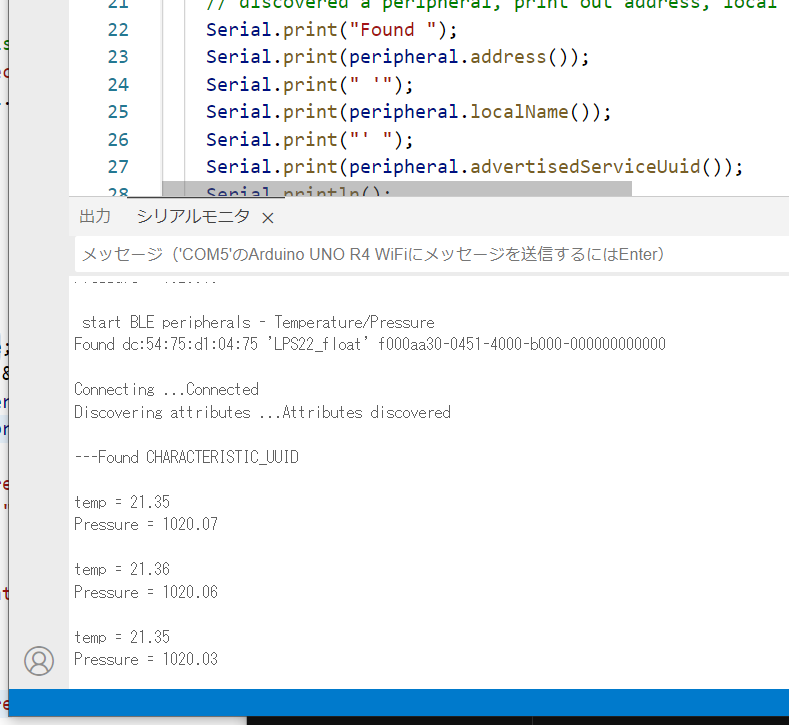
실행 예시입니다.
LED 매트릭스에 기압 표시
LED 매트릭스에 텍스트를 표시하기 위한 설명입니다. Arduino UNO R4 WiFi LED 매트릭스 사용
전체 스케치입니다.
#include <ArduinoBLE.h>
#include "ArduinoGraphics.h"
#include "Arduino_LED_Matrix.h"

ArduinoLEDMatrix matrix;

#define localNAME "LPS22_float"
#define LPS22_Temp_Characteristic_UUID    "F000AA31-0451-4000-B000-000000000000"  // BLE  Characteristic
#define LPS22_Press_Characteristic_UUID   "F000AA32-0451-4000-B000-000000000000"

void setup() {
  Serial.begin(115200);
  while (!Serial) delay(10);
  matrix.begin();
    matrix.beginDraw();
  matrix.stroke(0xFFFFFFFF);
  // add some static text
  // will only show "UNO" (not enough space on the display)
  const char text[] = "UNO r4";
  matrix.textFont(Font_4x6);
  matrix.beginText(0, 1, 0xFFFFFF);
  matrix.println(text);
  matrix.endText();

  matrix.endDraw();

  BLE.begin();
  Serial.println("\n start BLE peripherals - Temperature/Pressure");
  // start scanning for peripherals
  BLE.scanForName(localNAME);
}

void loop() {
  // check if a peripheral has been discovered
  BLEDevice peripheral = BLE.available();

  if (peripheral) {
    // discovered a peripheral, print out address, local name, and advertised service
    Serial.print("Found ");
    Serial.print(peripheral.address());
    Serial.print(" '");
    Serial.print(peripheral.localName());
    Serial.print("' ");
    Serial.print(peripheral.advertisedServiceUuid());
    Serial.println();

    if (peripheral.localName() != localNAME) {
      return;
    }
    // stop scanning
    BLE.stopScan();

    readData(peripheral);

    // peripheral disconnected, start scanning again
    BLE.scanForName(localNAME);
  }
}

void readData(BLEDevice peripheral) {
  // connect to the peripheral
  Serial.print("\nConnecting ...");

  if (peripheral.connect()) {
    Serial.println("Connected");
  } else {
    Serial.println("Failed to connect!");
    return;
  }

  // discover peripheral attributes
  Serial.print("Discovering attributes ...");
  if (peripheral.discoverAttributes()) {
    Serial.println("Attributes discovered\n");
  } else {
    Serial.println("Attribute discovery failed!");
    peripheral.disconnect();
    return;
  }
  // retrieve the characteristic
  BLECharacteristic Temperature_Characteristic = peripheral.characteristic(LPS22_Temp_Characteristic_UUID);
  BLECharacteristic Pressure_Characteristic  = peripheral.characteristic(LPS22_Press_Characteristic_UUID);

  if (!Temperature_Characteristic) {
    Serial.println("Peripheral does not have Temp characteristic!");
    peripheral.disconnect();
    return;
  }

  Serial.println("---Found CHARACTERISTIC_UUID");
  while (peripheral.connected()) {
  if (Temperature_Characteristic.canRead()) {
    // read the characteristic value
    Temperature_Characteristic.read();
    if (Temperature_Characteristic.valueLength() > 0) {
      uint32_t  data = ((uint8_t)*(Temperature_Characteristic.value()+3) << 24) + ((uint8_t)*(Temperature_Characteristic.value()+2) << 16) + ((uint8_t)*(Temperature_Characteristic.value()+1) << 8)  +  ((uint8_t)*Temperature_Characteristic.value());
      int32_t f = pow(-1, int(bitRead(data,31)));
      double k =1 + ((((data<<1)<<8)>>9))/pow(2,23);
      int32_t s = pow(2,((((data<<1)>>24))-127));
      Serial.print("\ntemp = ");
      Serial.println(f*k*s);

      Pressure_Characteristic.read();
      data = ((uint8_t)*(Pressure_Characteristic.value()+3) << 24) + ((uint8_t)*(Pressure_Characteristic.value()+2) << 16) + ((uint8_t)*(Pressure_Characteristic.value()+1) << 8)  +  ((uint8_t)*Pressure_Characteristic.value());
      f = pow(-1, int(bitRead(data,31)));
      k =1 + ((((data<<1)<<8)>>9))/pow(2,23);
      s = pow(2,((((data<<1)>>24))-127));
      Serial.print("Pressure = ");
      Serial.println(f*k*s);

      matrix.beginDraw();
      matrix.stroke(0xFFFFFFFF);
      matrix.textScrollSpeed(90);
      String text=String(f*k*s,1);
      matrix.textFont(Font_5x7);
      matrix.beginText(0, 1, 0xFFFFFF);
      matrix.println("    " + text + "   ");
      matrix.endText(SCROLL_LEFT);
      matrix.endDraw();
      delay(1000);
    }
  }
}

  Serial.println("Peripheral disconnected");
}
실행 예시입니다.왼쪽의 마이컴 보드입니다.
'아두이노우노 R4' 카테고리의 다른 글
| DIY 홈보안 시스템 Arduino Uno R4 Wi-Fi키패드 LCD 디스플레이 (2) | 2024.11.02 |
|---|---|
| UNO R4 WiFi BLE ⑥ BME280의 BLE 주변기기와 연결되는 센트럴 (2) | 2024.10.11 |
| UNO R4 WiFi BLE ⑤ BME280의 BLE peripheral (2) | 2024.10.11 |
| UNO R4 WiFi BLE ④ 기압 센서 BME280을 연결 (3) | 2024.10.11 |
| Arduino를 사용한 스마트 주차 시스템 (7) | 2024.10.04 |
| ADXL345 가속도계와 아두이노 UNO 연동하기 (5) | 2024.09.11 |
| 아두이노 가속도계 ADXL356, ADXL345, ADXL335 (5) | 2024.09.11 |
| Arduino Uno, DFPlayer Mini 및 푸시 버튼 사용 오디오 재생 (7) | 2024.09.10 |
취업, 창업의 막막함, 외주 관리, 제품 부재!
당신의 고민은 무엇입니까? 현실과 동떨어진 교육, 실패만 반복하는 외주 계약,
아이디어는 있지만 구현할 기술이 없는 막막함.
우리는 알고 있습니다. 문제의 원인은 '명확한 학습, 실전 경험과 신뢰할 수 있는 기술력의 부재'에서 시작됩니다.
이제 고민을 멈추고, 캐어랩을 만나세요!
코딩(펌웨어), 전자부품과 디지털 회로설계, PCB 설계 제작, 고객(시장/수출) 발굴과 마케팅 전략으로 당신을 지원합니다.
제품 설계의 고수는 성공이 만든 게 아니라 실패가 만듭니다. 아이디어를 양산 가능한 제품으로!
귀사의 제품을 만드세요. 교육과 개발 실적으로 신뢰할 수 있는 파트너를 확보하세요.
캐어랩


